
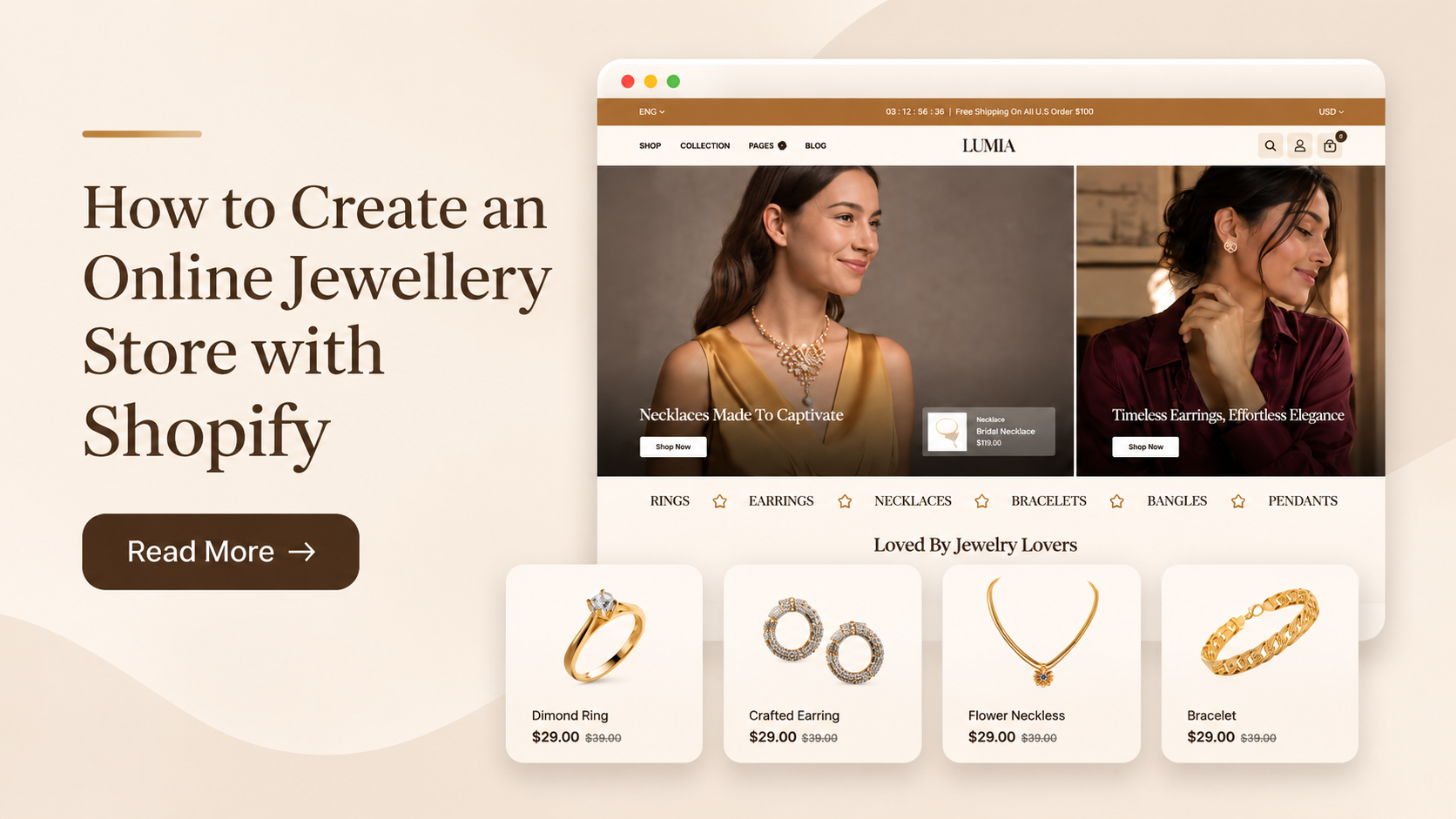
The jewellery industry offers opportunities for businesses selling fine jewellery, fashion accessories, handmade ornaments, and customized pieces. However, building a successful eCommerce business requires more than uploading product photographs and adding prices. Merchants need a structured product catalogue, reliable inventory management, an optimized storefront, secure checkout, and a marketing strategy that attracts the right customers. Creating an Online Jewellery Store with Shopify gives merchants access to an eCommerce platform to manage products, configure storefront layouts, process orders, and monitor business performance. Shopify also offers customization options and supports Premium Shopify Themes that help businesses create visually appealing storefronts aligned with their brand identity and product requirements.
Whether you are launching a new jewellery brand or moving an existing retail business online, this guide explains the technical and operational steps involved in building a Shopify jewellery store.
Why Is Shopify a Good Choice for Your Jewellery Business?
Building an online jewellery business involves more than displaying attractive products. You need a reliable platform to manage product details, handle orders, maintain inventory, and give customers a smooth shopping experience. Shopify brings these essential store operations together, making it a practical option for both new jewellery entrepreneurs and established retailers moving online. Here are some reasons Shopify works well for jewellery businesses:
- Flexible store design: Customize your storefront to reflect your jewellery brand, whether you sell minimalist everyday pieces, handcrafted accessories, luxury collections, or gemstone jewellery. You can organize product categories and create dedicated sections for featured collections.
- Detailed product presentation: Jewellery shoppers often want to check material, size, weight, gemstone details, and care instructions before purchasing. Shopify lets you add product descriptions, images, variants, and metafields to present these specifications clearly.
- Inventory and order management: Keep track of product availability, manage variants such as ring sizes and chain lengths, and monitor orders from your Shopify admin. This is particularly useful when your catalogue includes multiple designs and variations.
- Secure checkout options: Shopify supports payment integrations that help customers complete purchases through available payment methods. You can configure checkout settings according to your target market and business requirements.
- Mobile-friendly shopping: Many customers browse jewellery collections on their phones. Shopify responsive themes offer responsive layouts, helping your product images, navigation, and checkout adapt to different screen sizes.
- Built-in SEO capabilities: You can edit page titles, meta descriptions, product URLs, and image alt text to improve how your jewellery products appear in search results. You can also connect your store with Google Search Console to monitor search performance.
- Room to expand: As your business grows, you can add sales channels, integrate marketing and customer support apps, and introduce new product categories without rebuilding your entire store.
How to Set Up an Online Jewellery Store with Shopify
In this guide, we will walk through each step of setting up your Shopify jewellery store, from choosing your products and designing your storefront to adding essential features and preparing for launch. This will help you build your online business with a clear plan.
1. Choose Your Jewellery Niche
Before setting up your online jewellery store, decide what your business will sell and how it will operate. Your product category influences catalogue structure, inventory requirements, product attributes, pricing, and shipping configurations. Some common jewellery business categories include:
- Fine Jewellery: Gold, platinum, diamond, and gemstone jewellery.
- Fashion Jewellery: Artificial earrings, necklaces, bracelets, and rings.
- Silver Jewellery: Sterling silver accessories and contemporary silver designs.
- Handmade Jewellery: Artisan-created products with distinctive materials and designs.
- Personalized Jewellery: Customized name pendants, engraved bracelets, and birthstone accessories.
- Bridal Jewellery: Wedding sets, engagement rings, and occasion-specific collections.
Next, determine your business model.
| Business model | How it works |
|---|---|
| Inventory-based | Purchase or manufacture products and maintain stock before selling. |
| Made-to-order | Manufacture products after receiving customer orders. |
| Dropshipping | A supplier stores and ships products directly to customers. |
| Custom manufacturing | Develop exclusive jewellery designs through a manufacturing partner. |
| Handmade production | Create products in-house and manage the production process. |
2. Research Your Target Market and Competitors
Market research helps identify customer expectations, product opportunities, and suitable pricing strategies before investing in inventory. Start by analyzing competing jewellery businesses and their eCommerce websites. Review their product categories, pricing structures, promotional strategies, product photography, and customer feedback. Use tools such as Google Trends and Google Keyword Planner to evaluate search interest in terms related to your products. Research these areas:
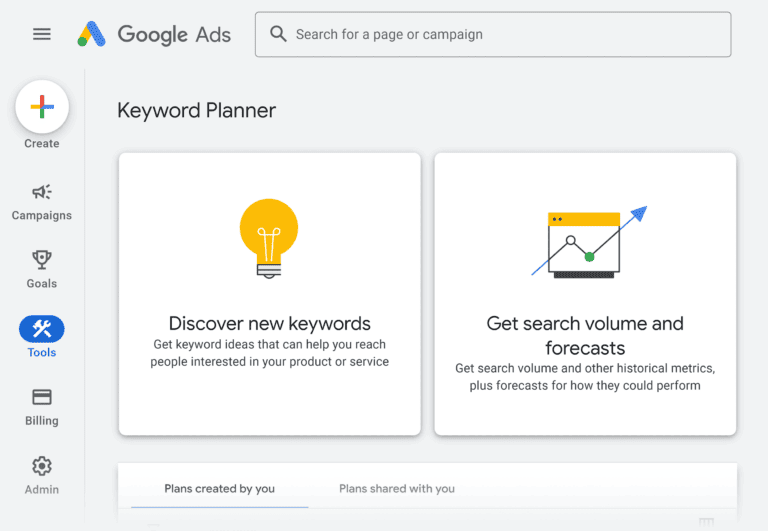
- Customer preferences for jewellery materials, styles, and designs.
- Demand for specific product categories and seasonal collections.
- Competitor pricing and product positioning.
- Frequently asked questions about authenticity, sizing, and maintenance.
- Search terms customers use when looking for jewellery online.
You can also examine customer reviews on marketplaces and social platforms to identify common purchasing concerns. Use the research to define your product range and establish a clear brand position. Avoid building your catalogue around assumptions without validating whether customers are interested in those products.
3. Source Products and Verify Product Quality
Product sourcing determines the consistency, quality, and profitability of your jewellery business. Select suppliers or manufacturing partners who can provide accurate material information and maintain reliable production standards. Before finalizing a supplier, evaluate:
- Material specifications and product quality.
- Minimum order quantities and wholesale pricing.
- Manufacturing capacity and lead times.
- Product customization options.
- Packaging and shipping arrangements.
- Quality inspection and replacement policies.
Request physical samples before listing products. Inspect finishing, clasps, stone settings, surface quality, dimensions, and packaging. For precious-metal and gemstone products, verify relevant certifications, hallmarking, and authenticity documentation where applicable. Maintain a product sourcing record with supplier details, SKU references, purchase costs, and quality specifications. This information helps with inventory planning and product support.
4. Create Your Jewellery Brand Identity
Your brand identity should remain consistent across your Shopify website, packaging, advertisements, and social media profiles. Set up the following brand elements:
- Brand name: Select a distinctive name that is easy to remember and relevant to your business.
- Logo: Create a scalable logo that works across website headers, packaging, and promotional materials.
- Typography: Select readable fonts for headings, product descriptions, and navigation.
- Colour palette: Choose a consistent combination of colours that complements your product photography.
- Brand messaging: Define the values, craftsmanship, materials, and design approach behind your jewellery.
- Packaging: Create packaging that protects products and reinforces the brand experience.
5. Set Up Your Shopify Store
After finalizing your jewellery business plan, the next step is to set up your online jewellery store on Shopify and configure its basic settings. Start by registering your account and completing the essential store configurations to prepare your business for online sales.
Step 1: Create Your Shopify Account

Visit Shopify and sign up using your business email address. Complete the initial registration process to access your Shopify admin dashboard, where you can manage your store.
Step 2: Add Your Store Details
Open your Shopify admin and review the store information. Add your store name, business address, contact details, default currency, time zone, and preferred language. These details help establish your store’s basic identity and settings.
Step 3: Connect Your Domain
A custom domain gives your jewellery business a professional online address. Go to Settings → Domains to purchase a new domain through Shopify or connect one you already own. Follow the displayed instructions to complete the domain connection.
Step 4: Set Up Markets and Shipping
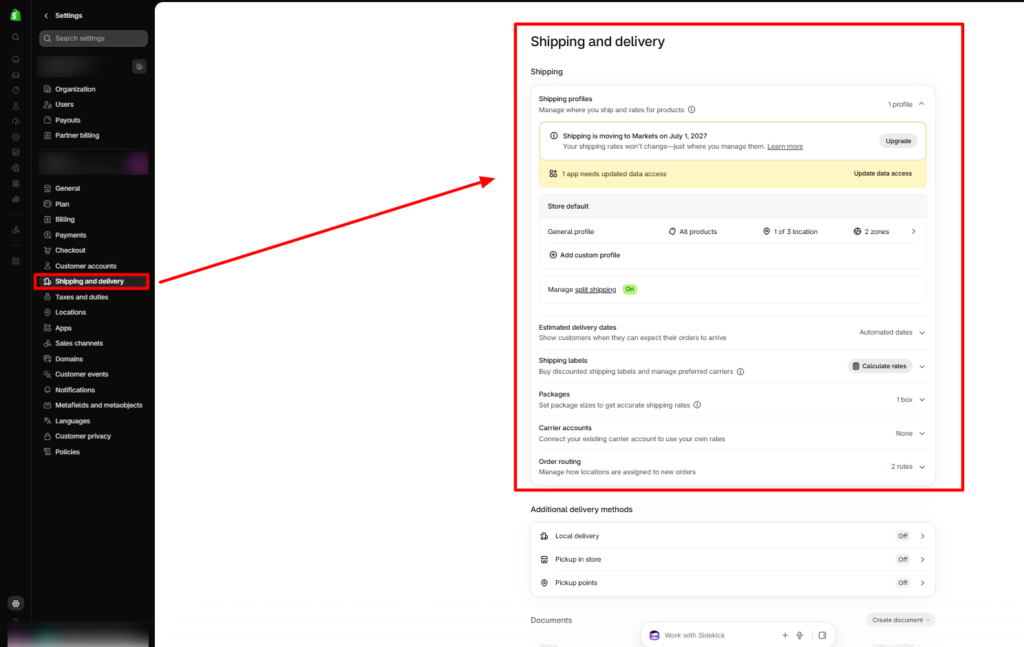
Decide where you want to sell your jewellery. Open Settings → Markets to configure your target selling regions. Next, go to Settings → Shipping and delivery to add shipping zones, delivery methods, and shipping rates based on your business requirements.
Step 5: Configure Checkout
Go to Settings → Checkout to manage how customers place their orders. Review the customer contact options, required address information, and other checkout settings to make the purchasing process convenient.
Step 6: Create Essential Store Pages
Before launching, add the important pages customers may need when shopping from your jewellery store. Navigate to Online Store → Pages and create:
- About Us: Introduce your jewellery brand and share its story.
- Contact Us: Provide details customers can use to reach your business.
- FAQs: Answer common questions about products, payments, and orders.
- Shipping Policy: Explain delivery methods, charges, and estimated timelines.
- Return and Refund Policy: Clearly state your return, exchange, and refund conditions.
- Privacy Policy: Explain how customer information is collected and used.
- Terms of Service: Outline the terms and conditions for using your store.
6. Choose and Customize a Jewellery Shopify Theme
Once your Shopify store is ready, choose a theme that suits your jewellery brand and product catalogue. Follow these steps to install and customize it:
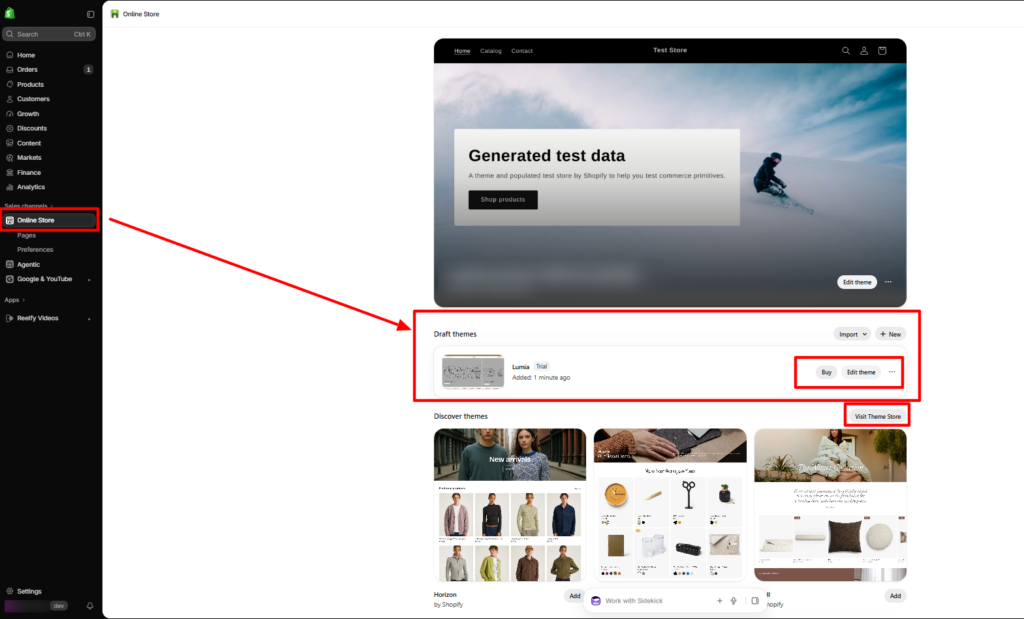
- Go to Shopify Admin → Online Store → Themes.
- Browse the available themes or upload a theme that you have purchased.
- For a jewellery-focused design, you can consider the Lumia Jewelry Shopify Theme.
- Click Customize to open the Shopify theme editor.
- Add your brand logo, set the colours, and choose suitable typography.
- Configure the homepage banner and featured collection sections.
- Create collection sections for rings, necklaces, earrings, bracelets, and other product categories.
- Customize product pages to display images, descriptions, prices, and product variants.
- Set up the header, navigation menu, footer, and other essential sections.
- Preview the storefront on des ktop and mobile devices.
- Make the required changes and click Publish when your store is ready.
7. Add and Organize Your Jewellery Products
After setting up your storefront, add your jewellery products and organize them into relevant categories. A well-structured catalogue helps customers browse your collections and makes product management easier.
Step 1: Add Products to Your Shopify Store
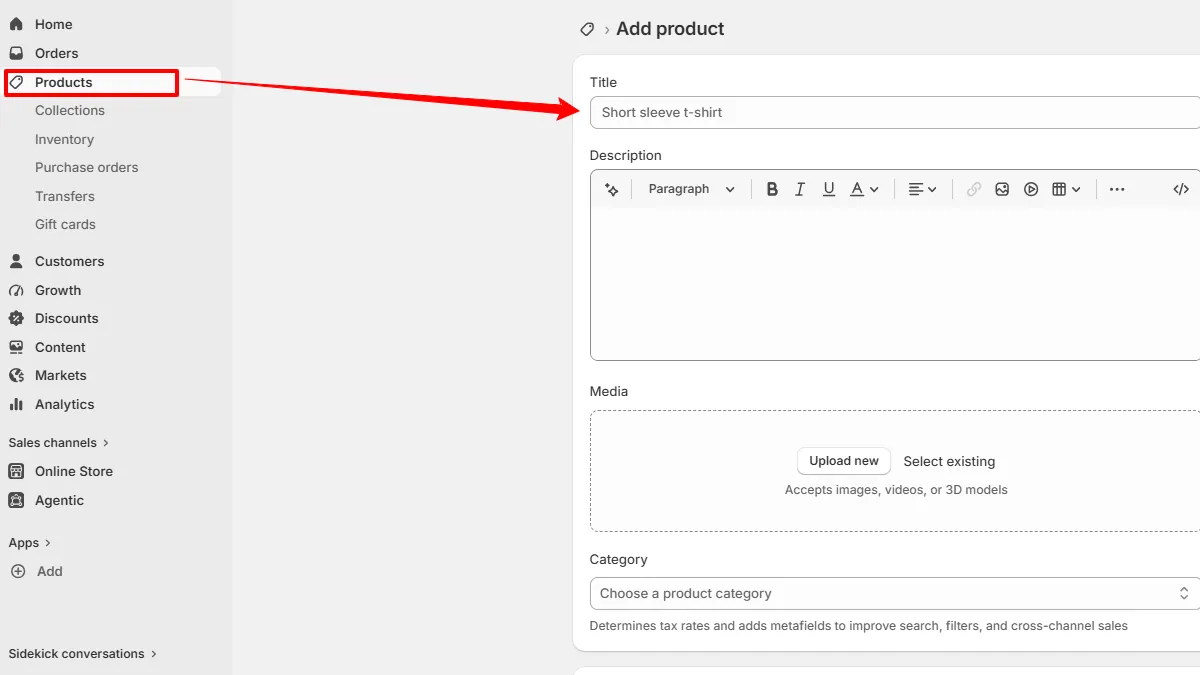
Go to Shopify Admin → Products → Add product. Enter the essential details for each jewellery item:
- Product title and description.
- High-quality product images and videos.
- Product category and product type.
- Selling price and compare-at price, if applicable.
- SKU and barcode, if available.
- Inventory quantity and tracking details.
- Product weight and shipping information.
Step 2: Set Up Product Variants
If a jewellery design is available in different sizes, colours, or materials, add these options under the product’s Variants section. Assign the relevant price, SKU, and inventory quantity to each variant so customers can select their preferred option before purchasing.
Step 3: Create Product Collections
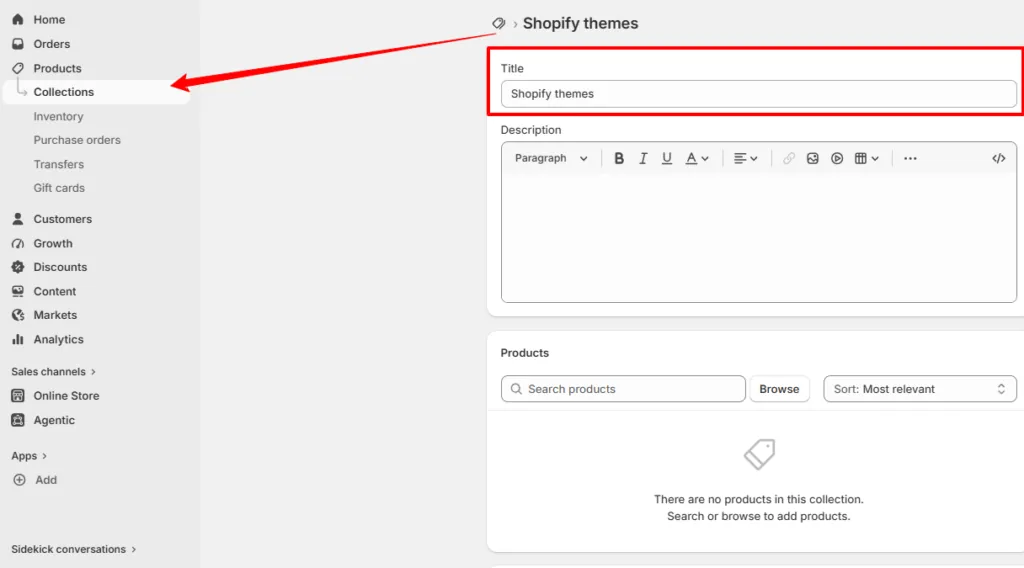
Collections help group similar jewellery products, making it easier for shoppers to browse your catalogue. Go to Products → Collections → Create collection and add categories. Shopify supports manual and automated collections. You can add products individually or set conditions based on product types, tags, and other available attributes.
Step 4: Configure Inventory Tracking
Open a product or variant and locate the Inventory section. Enable inventory tracking and enter the available stock quantity. If your business operates from multiple locations, maintain the inventory details for each location. For made-to-order jewellery, clearly mention the production and dispatch timelines so customers know when to expect their purchases.
Step 5: Review Your Product Catalogue
Before moving forward, check that product information, images, prices, variants, and stock quantities are accurate. Make sure every product is assigned to the correct collection and is available on the intended sales channels. A properly organized catalogue helps maintain consistent product information while making it easier for customers to find the jewellery they want.
8. Use Shopify Metafields for Detailed Jewellery Information
Jewellery products often require more information than standard product titles and descriptions can provide. Shopify metafields allow merchants to store additional structured information and display it through compatible theme sections.
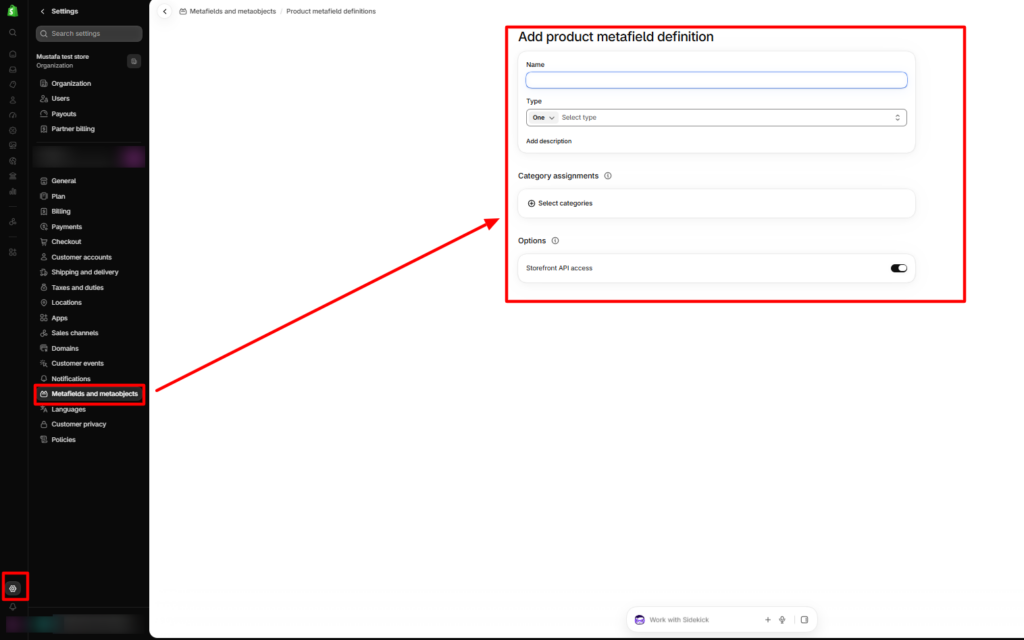
Navigate to Settings → Metafields → Products and create the required metafield definitions. Useful jewellery product metafields include:
| Metafield | Example value |
|---|---|
| Metal type | Sterling Silver |
| Purity | 925 |
| Gemstone | Natural Ruby |
| Stone shape | Oval |
| Jewellery weight | 4.5 g |
| Chain length | 18 inches |
| Care instructions | Store in a dry jewellery box |
| Certification | Applicable certificate details |
Choose suitable field types based on the information being stored. For example, use text fields for material descriptions, measurement fields for dimensions, and file references when attaching supporting documents. After defining the metafields:
- Open Products in Shopify admin.
- Select the jewellery product you want to update.
- Scroll to the metafields section.
- Enter the relevant product-specific information.
- Save the product.
- Open the theme editor and locate the compatible product information section.
- Use the dynamic source icon to connect the relevant metafield to the storefront.
9. Optimize Jewellery Product Pages
A good product page should present your jewellery clearly and help customers understand its design, quality, and specifications before making a purchase. Use high-quality product photographs to highlight the details of each jewellery piece. Include multiple angles, close-up shots of gemstones and metal finishes, and lifestyle images showing how the jewellery looks when worn. Keep image quality clear while optimizing file sizes to support faster page loading.
Write informative descriptions that explain the product’s design, materials, and important details. Include specifications such as metal type, purity, gemstone details, weight, dimensions, available sizes, and care instructions wherever relevant. For customized or made-to-order jewellery, clearly mention the available options and production timelines. Keep all product claims accurate and verifiable. Make sure customers can easily view product information and complete their purchases. Include visible pricing, variant selection, quantity controls, and an Add to Cart button. You can also display product availability, shipping and return information, customer reviews, and related product recommendations to support the buying decision.
10. Set Up Payments, Shipping, and Order Fulfillment
Once your product catalogue is ready, configure payment and delivery options for your online jewellery store so customers can place orders conveniently. A clear fulfilment process also helps you manage purchases and keep customers informed.
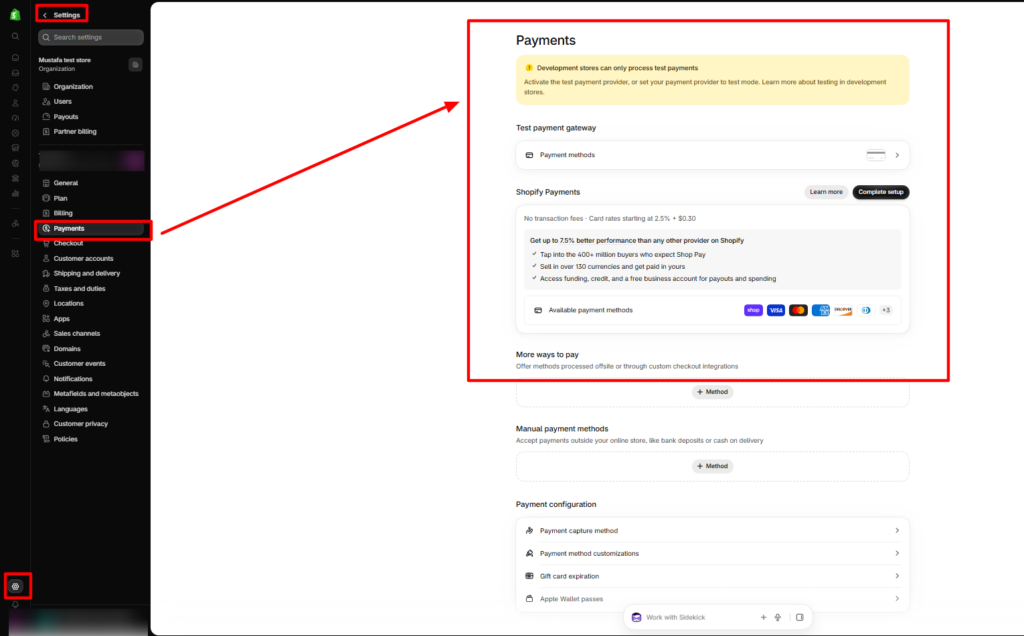
- Payment Setup
Go to Shopify Admin → Settings → Payments to review the payment providers available for your business location. Choose a suitable provider and complete its activation requirements. Depending on availability and eligibility, Indian merchants can consider supported payment gateways such as Razorpay. Before enabling a payment method, review its transaction charges, settlement timelines, supported payment options, and refund process.
- Shipping and Delivery Setup
Navigate to Settings → Shipping and delivery to configure how jewellery orders will reach your customers. Set up shipping zones, delivery rates, free-shipping conditions, and fulfillment locations according to your business requirements. Since jewellery can be valuable and delicate, use secure packaging and consider tracked and insured delivery options. Make sure your shipping policy clearly explains delivery timelines, charges, and handling procedures.
- Order Fulfillment and Management
When a customer places an order, open the Orders section in your Shopify admin to review its details and payment status. Confirm the product and variant, check inventory, and prepare the jewellery for dispatch using suitable protective packaging. Once the order is shipped, mark it as fulfilled and add tracking details when available so customers can follow their delivery.
11. Implement Technical SEO
Technical SEO helps search engines crawl and index your Shopify jewellery store while making it easier for customers to navigate your website. Start by creating clear, descriptive URLs for product and collection pages, such as /collections/silver-jewellery and /products/gold-plated-necklace. Add unique SEO titles and meta descriptions to important pages, using relevant product and category details naturally. Add descriptive alt text to product images so search engines and screen readers can understand their content. Shopify automatically generates an XML sitemap, which you can submit through Google Search Console to monitor your website’s indexing status. Also, review canonical tags to ensure search engines identify the preferred version of your pages, especially when using product filters or multiple collection paths.
Structured data is another important part of technical SEO. Check whether your Shopify theme includes accurate Product schema with details such as product name, images, price, availability, and brand. Avoid adding duplicate schema through multiple apps or theme code. Finally, test your store using Google PageSpeed Insights and improve loading performance by optimizing images, reducing unnecessary apps and scripts, and checking Core Web Vitals. Focus on your homepage, collection pages, and product pages to provide a smoother shopping experience.
12. Set Up Store Navigation and Product Filters
Organize your jewellery store navigation so customers can quickly find the products they want. Create a clear main menu with categories such as rings, necklaces, earrings, bracelets, bridal jewellery, and new arrivals. You can also use dropdown menus to arrange related categories and make browsing easier.
To improve product discovery, use Shopify’s Search & Discovery app to configure collection filters. Depending on your product information and theme support, customers can filter jewellery by price, material, colour, size, gemstone, product type, and availability. Make sure the relevant product attributes are added correctly so the filters display useful results. Finally, test the navigation and filters on both desktop and mobile devices to ensure customers can browse your collections without difficulty.
13. Build Customer Trust and Improve Store Security
Building customer trust is essential for an online jewellery store because shoppers want confidence in the quality, authenticity, and value of the products they purchase. Provide accurate product specifications, genuine photographs, and applicable authenticity certificates. Display customer reviews, clear shipping estimates, transparent return and refund policies, and accessible customer support to help customers make informed decisions. Along with these trust elements, protect your Shopify store by using HTTPS, enabling two-step authentication for administrator accounts, and regularly reviewing third-party app permissions. Always use supported payment providers and Shopify’s secure checkout instead of collecting sensitive payment details through custom forms.
14. Promote Your Shopify Jewellery Store
Once your online jewellery store is ready, focus on attracting potential customers through different marketing channels. Improve your search visibility by publishing useful blog content on topics such as ring sizing, jewellery care, gemstone types, and comparisons between different materials. Link these articles to relevant product and collection pages to help readers find suitable products. Use platforms like Instagram and Pinterest to share product photographs, styling videos, new collection updates, and customer experiences. You can also use email marketing to send welcome messages, abandoned checkout reminders, product announcements, and post-purchase updates. To reach a wider audience, consider running targeted campaigns through Google Ads and Meta Ads or collaborating with jewellery and fashion influencers. Monitor the results of each campaign to understand which channels bring visitors and generate sales.
15. Monitor and Improve Your Store Performance
After launching your Shopify themes for jewelry store , regularly review its performance using Shopify Analytics, Google Analytics 4, and Google Search Console. Pay attention to important metrics such as website traffic, conversion rate, average order value, add-to-cart rate, completed checkouts, customer acquisition cost, repeat purchases, and inventory turnover. These insights help you understand customer behaviour and identify areas that need improvement. For example, if a collection receives visitors but generates very few sales, review its product images, pricing, descriptions, and navigation. Similarly, if customers add products to their carts but leave before completing checkout, check shipping charges, available payment methods, and the checkout experience. Make improvements based on your store data and monitor the results to understand what works best.
Final Thoughts
Building a successful online jewellery store on Shopify requires a well-organized storefront, attractive product presentation, and effective marketing. From managing product details and customizing your website to improving SEO and handling orders, every element contributes to a smooth shopping experience. The Lumia Jewelry Shopify Theme is worth considering if you want a jewellery-focused design with refined product layouts and curated collections.
To grow your online jewellery store, focus on accurate product information, easy navigation, secure checkout, and regular store improvements. These efforts can help build customer confidence and create a strong foundation for long-term business growth.
Frequently Asked Questions
1. How do I start an online jewellery store with Shopify?
Start by selecting a jewellery niche, researching your target customers, sourcing products, and developing your brand identity. Create a Shopify account, follow the how to Connect domain to Shopify process, select a suitable theme, configure product collections, and set up payment and shipping options. Before launching, test product pages, checkout, mobile responsiveness, and SEO settings.
2. Which Shopify theme is suitable for a jewellery store?
Choose a theme with elegant product layouts, responsive design, flexible sections, organized collection pages, and useful product discovery features. Lumia by SAMS is a jewellery-focused preset of the Nexus Beauty Shopify theme , designed around refined storefront layouts and jewellery collection presentation.
3. How can I add jewellery specifications to Shopify product pages?
Use Shopify metafields to store structured product information such as metal type, purity, gemstone, weight, dimensions, and care instructions. Connect the metafields to compatible theme sections through dynamic sources in the Shopify theme editor.
4. How can I improve SEO for a jewellery Shopify store?
Optimize product titles, meta descriptions, URLs, image alt text, collection content, and internal links. Submit your Shopify XML sitemap to Google Search Console, review canonical tags, validate structured data, and improve mobile performance.
5. What payment methods should a jewellery store offer?
Payment options depend on your business location and provider eligibility. Merchants can review Shopify-supported payment providers and suitable third-party gateways. Consider transaction fees, payment security, settlement timelines, and customer preferences before selecting payment methods.
6. How can I manage jewellery inventory in Shopify?
Enable inventory tracking for products and variants, assign unique SKUs, and maintain accurate stock quantities. For stores with multiple locations, configure inventory according to each location. Review stock levels regularly to avoid overselling and fulfillment delays.
7. Can I sell customized jewellery through Shopify?
Yes. You can use product variants, line item properties, compatible product customization applications, or custom-developed functionality to collect personalization details such as engraving text, names, and design preferences. Test how customization information is transferred into orders before accepting customer purchases.