
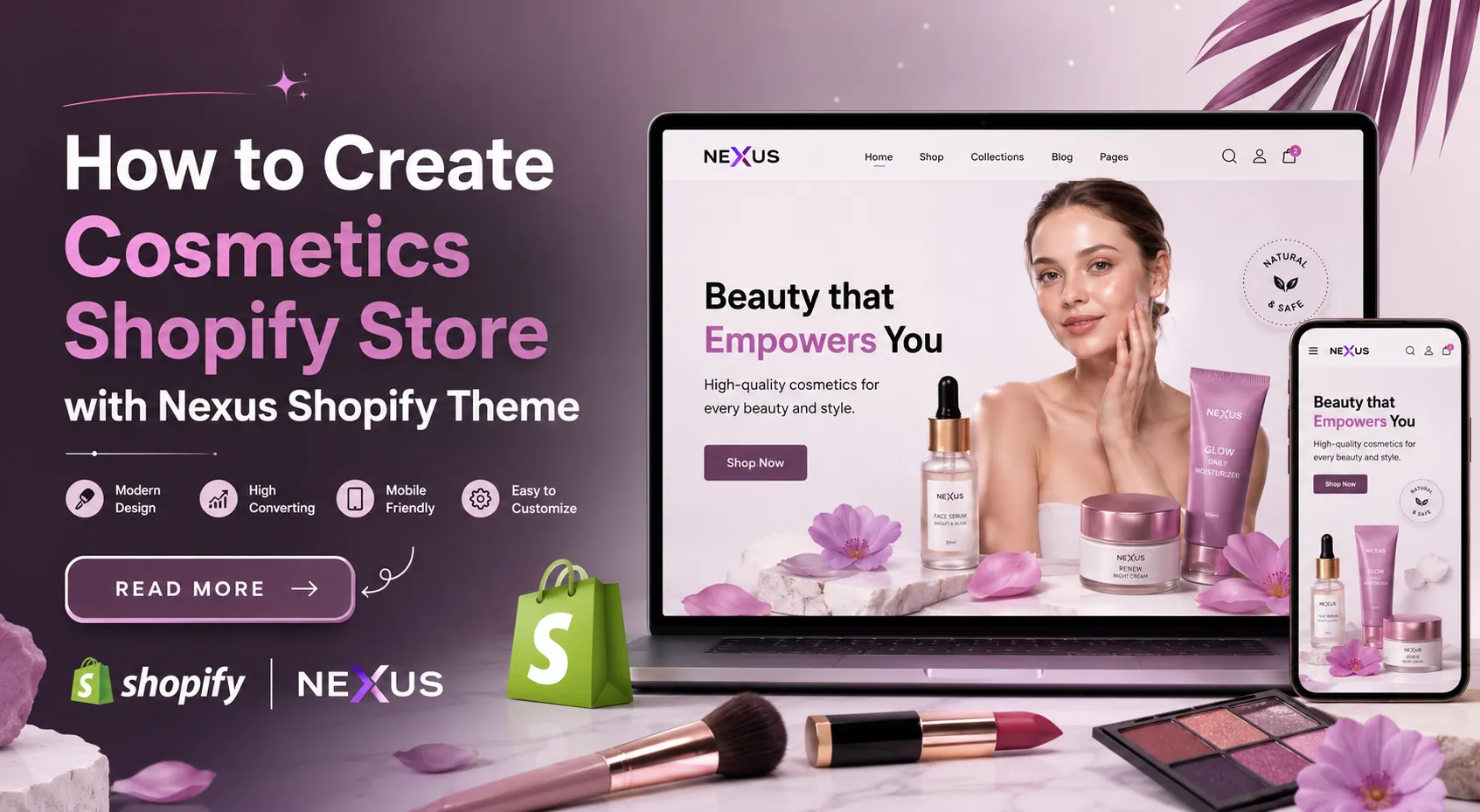
The beauty and cosmetics industry is growing rapidly, and having a professional online store is essential for attracting customers and increasing sales. Shopify is one of the most trusted eCommerce platforms, offering everything you need to launch and manage a successful cosmetics business. When paired with a premium Shopify theme, you can create a visually stunning, fast-loading, and mobile-friendly store that delivers an exceptional shopping experience.
From showcasing skincare, makeup, fragrances, and beauty accessories to enabling secure payments and seamless navigation, a premium theme provides all the essential features your business needs. In this guide, you’ll learn how to create a cosmetics Shopify store using a premium Shopify theme, customize its design, organize products, optimize performance, and build a beauty website that reflects your brand while driving customer engagement and conversions.
Why Use the Nexus Shopify Theme for a Cosmetics Store?
The Nexus Shopify Theme is designed specifically for beauty, skincare, makeup, and wellness brands that want to create a premium online shopping experience while increasing conversions. With its modern design, flexible customization options, and conversion-focused features, Nexus helps you build a visually appealing cosmetics store that reflects your brand identity. Its mobile-responsive layout, fast-loading pages, and SEO-friendly structure ensure a smooth shopping experience across all devices while helping your store attract more organic traffic.
Key Benefits of Using Nexus Shopify Theme
The Nexus Shopify Theme includes a wide range of features tailored for beauty and cosmetics brands. Here are the key benefits that make it an excellent choice for creating a high-converting and visually appealing Shopify store.
- Conversion-Focused Shopping Experience: Nexus includes powerful conversion features such as a smart slide-out cart, Quick Buy, sticky cart, product badges, trust badges, stock counters, recommended products, promo banners, promo popups, and countdown timers. These tools reduce checkout friction, encourage purchases, and help increase average order value.
- Beautiful Design for Beauty Brands: The theme offers elegant layouts with high-resolution image support, image galleries, slideshows, before-and-after image sliders, product videos, image zoom, and rollover effects. These features help showcase skincare, makeup, and beauty products professionally.
- 25+ Flexible Beauty Sections: Nexus provides more than 25 customizable sections for featured products, skincare routines, testimonials, promotions, FAQs, ingredient details, and brand storytelling. You can easily create engaging pages without any coding.
- Easy Product Discovery: Customers can quickly find products using color swatches, mega menus, enhanced search, collection navigation, product filtering, sorting options, breadcrumbs, sticky headers, and swatch filters, creating a smooth browsing experience.
- Detailed Product Presentation: The theme supports product tabs, ingredient information, usage guides, size charts, multiple product options, image hotspots, product videos, and high-quality galleries, helping customers make informed buying decisions.
- Mobile-Optimized and Marketing Ready: Nexus is fully responsive and includes built-in marketing features such as blogs, FAQ pages, customizable contact forms, promotional banners, recommended products, and multilingual support. Combined with its SEO-friendly structure and Shopify’s reliable platform, it provides everything needed to grow a successful cosmetics store.
- Page Builder Apps: Create custom store pages effortlessly with the best Shopify page builder apps, giving you flexibility to design engaging layouts without coding.
With its premium design, conversion-focused tools, and flexible customization options, the Nexus Shopify Theme provides everything needed to build a successful cosmetics store. It helps you deliver an exceptional shopping experience while supporting long-term business growth.
Steps to Create Cosmetics Shopify Store using Nexus Shopify Theme
Before starting the customization process, explore the best Shopify themes for cosmetics store to find a design that matches your products, branding, and store requirements.
Launching a successful Cosmetics Shopify Store requires more than simply uploading products. From choosing the right Shopify plan to organizing collections, configuring payments, optimizing SEO, and testing your store before launch, every step contributes to creating a professional shopping experience. After installing the Nexus Shopify Theme, the next stage is customizing your store according to your beauty brand’s identity and ensuring customers can easily browse, discover, and purchase products. Follow the step-by-step process below to build a fully functional and conversion-focused cosmetics store.
Step 1: Purchase a Shopify Plan
The first step in creating your Cosmetics Shopify Store is signing up for Shopify and selecting a subscription plan that matches your business requirements. Shopify provides a fully hosted eCommerce platform, eliminating the need to purchase separate web hosting or worry about server management. Whether you plan to sell skincare products, makeup, fragrances, organic beauty products, or cosmetic accessories, Shopify offers the infrastructure required to manage inventory, process payments, and grow your online business. Exploring different beauty product Shopify themes can help you compare layouts, product presentation options, navigation features, and customization capabilities before selecting a theme.
If you’re looking for a complete guide to Shopify beauty stores, this process covers the key steps from choosing a theme and setting up your store to adding products, configuring payments, and preparing for launch.
Begin by creating a Shopify account using your email address. During registration, you’ll provide basic business information such as your store name, business location, and preferred currency. Shopify automatically generates your store dashboard, where you’ll manage products, customers, themes, and orders from one centralized location.
Although Shopify offers several pricing plans, choose one that aligns with your expected sales volume, reporting requirements, and marketing needs. As your cosmetics business expands, upgrading to a higher plan is simple and doesn’t require rebuilding your website.
Before moving to customization, take time to configure your store settings, including business details, tax information, shipping origin, payment preferences, and notification emails. These settings ensure your store is prepared for future customer transactions.
During this step, make sure to:
- Create your Shopify account.
- Select the appropriate pricing plan.
- Add your business information.
- Set your preferred currency.
- Configure taxes and shipping origin.
- Complete the basic store settings.
- Verify your business email.
Once your Shopify account is ready, you can proceed to installing the Nexus Shopify Theme and begin designing your Cosmetics Shopify Store.
Step 2: Install the Nexus Shopify Theme
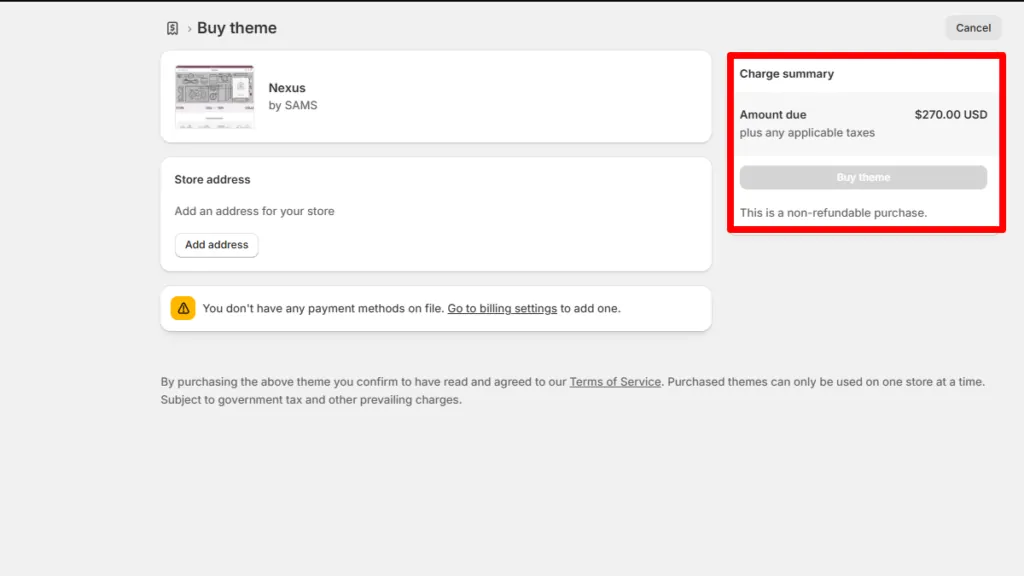
After setting up your Shopify account, the next step is to install the Nexus Shopify Theme and make it the foundation of your Cosmetics Shopify Store. Installing your theme gives your store its overall appearance, layout, and structure, allowing you to begin customizing pages, showcasing products, and creating a seamless shopping experience. Since the theme has already been selected, this step focuses on adding it to your Shopify store and preparing it for customization.
To get started, purchase the Nexus Shopify Theme from the Shopify Theme Store and add it to your Shopify account. Once the purchase is complete, the theme will appear in your Shopify admin under Online Store > Themes. Shopify allows you to preview the theme before publishing it, enabling you to explore its layouts and ensure everything is functioning correctly.
Before publishing the theme, it’s a good practice to duplicate your current theme (if applicable) to create a backup. This ensures you can safely make design changes without affecting your live storefront. You can then publish the Nexus theme and begin configuring its settings according to your brand requirements.
At this stage, your store will have the basic framework in place, making it ready for branding, homepage customization, product uploads, and navigation setup in the following steps.
Step 3: Customize Your Store Branding and Theme Settings
Once the Nexus Shopify Theme is installed, the next step is to personalize your Cosmetics Shopify Store so it accurately represents your brand. Branding plays a significant role in the beauty industry, where customers often associate premium design with product quality and trust. A consistent visual identity helps your store stand out while creating a memorable shopping experience for visitors.
Start by opening the Theme Editor in your Shopify admin. Here, you can customize your store’s colors, typography, logo, favicon, buttons, and overall layout without writing any code. Choose a color palette that complements your cosmetics brand, such as soft neutrals for skincare, elegant black and gold for luxury beauty products, or pastel shades for organic and natural cosmetics. Likewise, select readable fonts that maintain a professional appearance across desktops and mobile devices.
Next, upload your brand logo and favicon to strengthen brand recognition. You can also configure global settings like button styles, spacing, animations, and section widths to ensure a consistent design throughout the store. As you make changes, use Shopify’s live preview to see how your storefront appears in real time.
Remember to keep your design clean and uncluttered. Since cosmetics products rely heavily on visual appeal, the overall layout should highlight product images rather than distract customers with excessive colors or unnecessary design elements.
A well-branded Cosmetics Shopify Store builds credibility from the moment customers land on your website. Once your branding and global theme settings are complete, the next step is to design an engaging homepage that showcases your products, promotions, and brand story effectively.
Step 4: Customize the Homepage with Your Brand Content
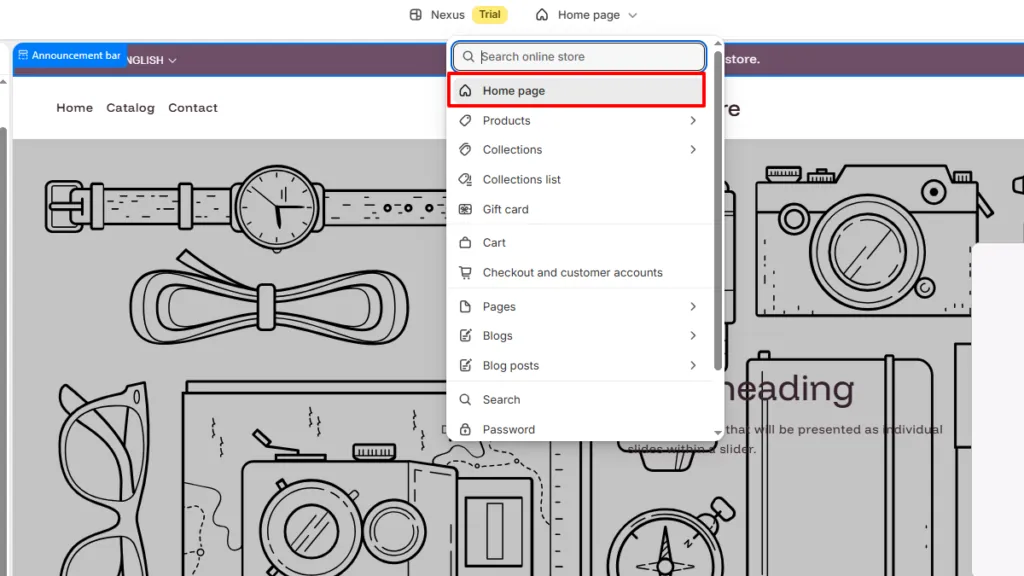
With your branding in place, it’s time to customize the homepage of your Cosmetics Shopify Store. Since the Nexus Shopify Theme already includes professionally designed homepage sections, you don’t need to build your homepage from scratch. Simply open the Theme Editor, replace the demo content with your own text, images, products, and promotional banners, and arrange the sections according to your business requirements.
Start by navigating to Online Store > Themes > Customize. The Shopify Theme Editor provides a live preview of your homepage, allowing you to edit every section without touching a single line of code. Replace the placeholder images with high-quality product photography, update headings and descriptions to match your brand voice, and link buttons to relevant collections or product pages. Consistent branding and professional visuals will make your homepage more engaging while helping visitors quickly discover your best-selling beauty products.
As you customize the homepage, ensure each section serves a clear purpose. Highlight featured collections, showcase skincare routines, promote seasonal offers, display customer testimonials, and create visually appealing product displays. Avoid overcrowding the homepage with excessive text or unnecessary sections. Instead, organize the content in a logical flow that guides customers from discovering your brand to exploring products and making a purchase.
To customize your homepage, open:
Online Store → Themes → Customize
Then update the following homepage sections with your own content:
- Slideshow – Add promotional banners, featured collections, and seasonal offers.
- Category Spotlight – Display your main product categories such as skincare, makeup, hair care, fragrances, and beauty tools.
- Featured Collection – Showcase your best-selling or newly launched cosmetics.
- Dual Image Showcase – Highlight two promotional campaigns or featured product ranges.
- Rotating Highlight Text – Display brand messages, offers, free shipping, or key selling points.
- Featured Collection Tabs – Organize products into categories like New Arrivals, Best Sellers, and Trending.
- Featured Image – Add a premium lifestyle or brand image with supporting content.
- Before & After – Showcase transformation results for skincare or beauty products.
- Countdown Timer – Promote limited-time sales, festive discounts, or product launches.
- Text Reveal – Share your brand story, product philosophy, or unique selling proposition.
- Featured Product – Highlight a hero product with detailed information and a strong call-to-action.
- Product Promo – Feature special offers, bundles, or exclusive discounts.
- Featured Collection – Display another collection such as organic skincare, premium makeup, or gift sets.
- Scroll List – Present featured categories, ingredients, or product benefits in an interactive format.
- Shop the Look – Allow customers to purchase complete beauty routines or curated product combinations.
- Bundle Builder – Enable customers to create personalized skincare or makeup bundles.
- Testimonials – Display customer reviews to build trust and social proof.
- Quiz – Help shoppers find products based on their skin type, beauty concerns, or preferences.
- Gallery Section – Showcase lifestyle images, user-generated content, or your Instagram feed.
- Featured Blog – Display your latest beauty guides, skincare tips, and makeup tutorials to improve engagement and SEO.
By replacing the demo content with your own branding, images, and products, you can transform the pre-built Nexus homepage into a unique and professional Cosmetics Shopify Store that captures attention, showcases your products effectively, and encourages customers to explore and shop with confidence.
Step 5: Customize the Essential Store Pages
After designing your homepage, the next step is to customize the essential pages of your Cosmetics Shopify Store. The Nexus Shopify Theme already includes professionally designed page templates, so you don’t need to create these pages from scratch. Simply open the page editor, replace the demo content with your own information, and personalize each page to match your brand.
Navigate to Online Store → Pages from your Shopify admin and edit each page by updating the text, images, contact details, policies, and branding. Make sure the information is clear, accurate, and reflects your business. These pages not only help customers learn more about your brand but also build trust and answer common questions before they make a purchase.
Customize the following pages:
- About Us – Share your brand story, mission, and values.
- Contact Us – Update your contact details, business hours, and contact form.
- FAQ – Answer common questions about products, orders, shipping, and returns.
- Shipping Policy – Explain shipping methods, delivery times, and charges.
- Refund & Return Policy – Clearly describe your return and exchange process.
- Privacy Policy – Inform customers how their personal information is collected and protected.
- Terms & Conditions – Outline the rules and conditions for using your store.
After updating the content, review every page for accuracy and consistency. Well-written and informative pages make your Cosmetics Shopify Store appear more professional, improve customer confidence, and contribute to a better overall shopping experience.
Step 6: Add Your Cosmetics Products
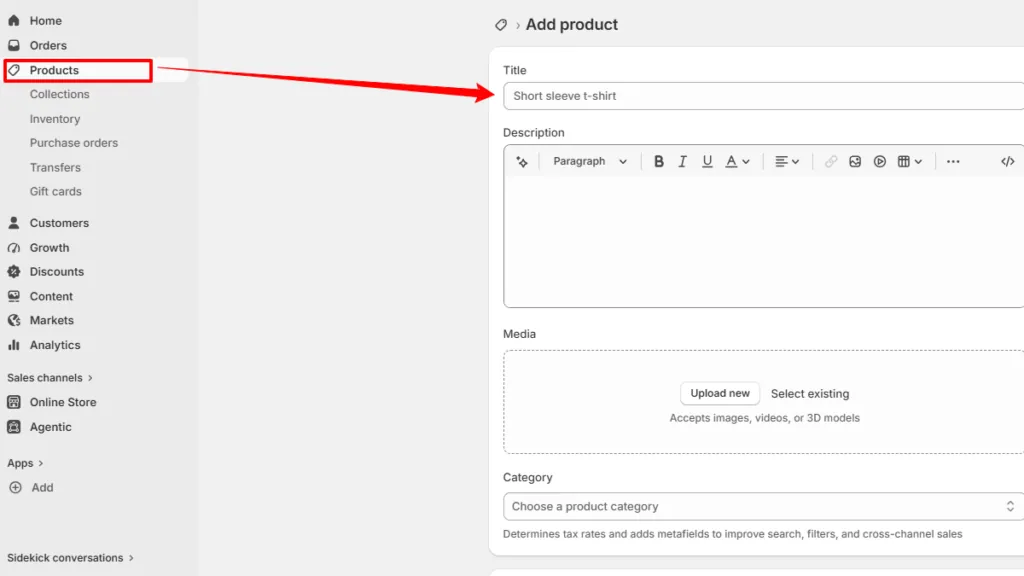
Now it’s time to populate your Cosmetics Shopify Store with the products you want to sell. A well-organized product catalog not only helps customers find what they’re looking for but also increases the chances of conversions. Shopify makes product management simple, allowing you to add detailed information, multiple images, pricing, and inventory for every item.
Navigate to Products → Add Product in your Shopify admin and begin adding each cosmetic product. Use clear product titles and write informative descriptions that highlight the product’s benefits, ingredients, usage instructions, and key features. Upload high-resolution images from different angles to give customers a better understanding of the product. If applicable, create variants for different shades, sizes, or fragrances and assign accurate pricing and inventory levels.
While adding your products, include:
- Product title
- Detailed product description
- High-quality product images
- Product pricing
- Compare-at price (if applicable)
- Product variants (shade, size, fragrance, etc.)
- Inventory quantity
- SKU and barcode
- Product collections
- Product tags
- SEO title and meta description
Once all products have been added, review every listing to ensure the information is accurate and consistent. A complete and professionally presented product catalog helps your Cosmetics Shopify Store build customer trust, improve search visibility, and deliver a better shopping experience.
Step 7: Organize Collections and Configure Store Navigation
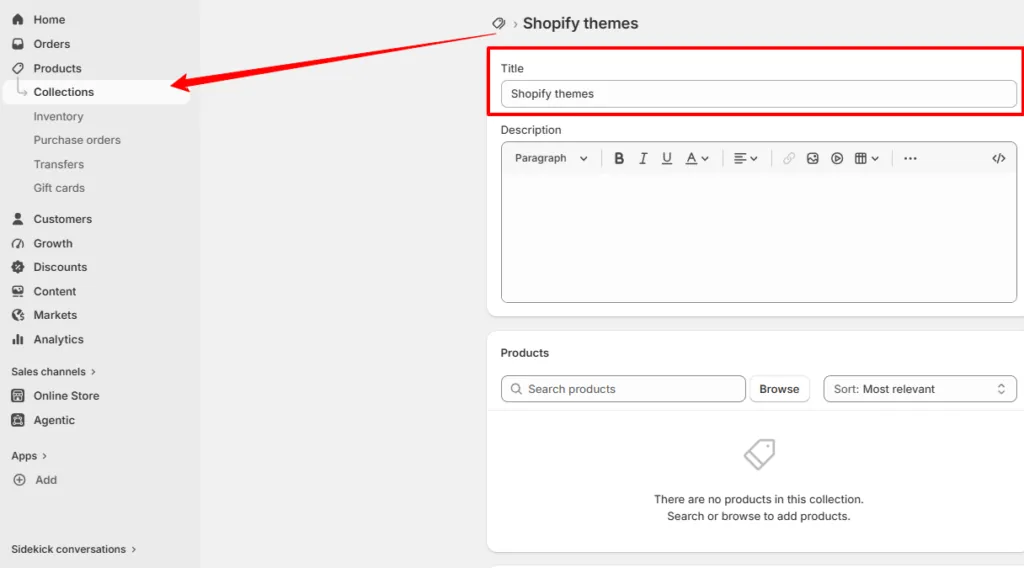
Once you’ve added your products, organize them into collections to make your Cosmetics Shopify Store easy to navigate. Well-structured collections help customers quickly browse products based on their interests, resulting in a smoother shopping experience and higher conversion rates.
Go to Products → Collections and create collections such as Skincare, Makeup, Hair Care, Fragrances, Beauty Tools, New Arrivals, Best Sellers, and Special Offers. You can create manual collections by selecting products individually or automated collections using conditions like product tags, type, or price.
Next, navigate to Online Store → Navigation to update your store menus. Add links to your collections, essential pages, blog, and featured products to create a clear and intuitive navigation structure. You can also organize dropdown menus to improve accessibility.
A well-organized navigation system enables customers to find products effortlessly, enhancing the overall user experience and making your Cosmetics Shopify Store more professional and customer-friendly.
Step 8: Configure Payment, Shipping, and Tax Settings
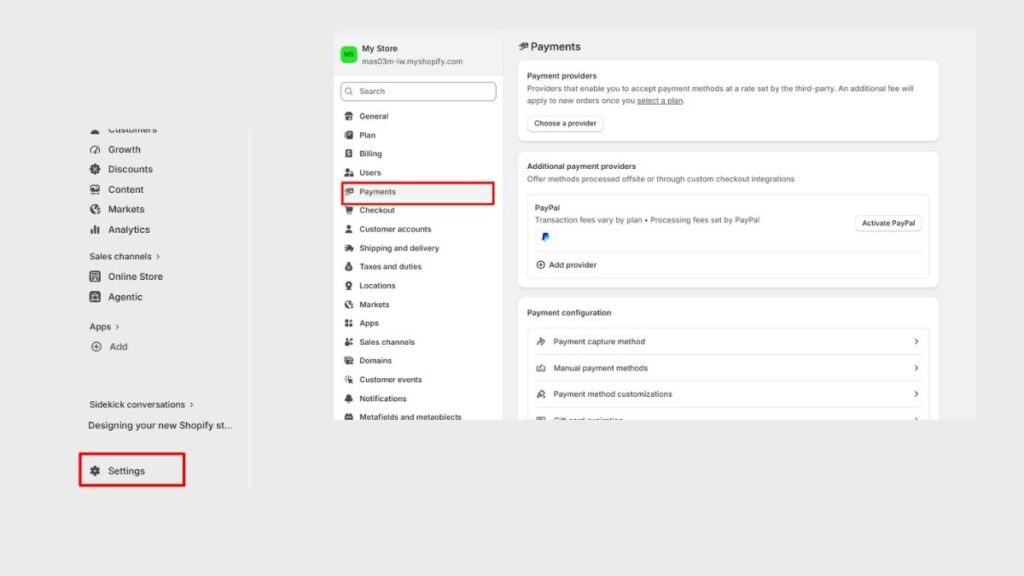
The next step is to configure the payment, shipping, and tax settings for your Cosmetics Shopify Store. Proper configuration ensures customers can complete their purchases securely while receiving accurate shipping rates and tax calculations during checkout.
Navigate to Settings in your Shopify admin and begin by setting up your preferred payment gateways. Choose the payment methods that best suit your target audience, such as credit/debit cards, digital wallets, or local payment options. Next, configure your shipping zones, delivery rates, and estimated delivery times based on the regions you serve. Finally, review your tax settings to ensure they comply with your local regulations and business requirements. If your business serves local customers, you can also consider Shopify in-store pickups as a fulfillment option alongside your regular shipping methods.
Complete the following configurations:
- Enable your preferred payment gateways.
- Set up shipping zones and delivery rates.
- Configure local and international shipping options.
- Add estimated delivery timelines.
- Set up tax calculations for your selling regions.
- Review checkout and customer information settings.
- Test the checkout process before launching.
Before making your Cosmetics Shopify Store live, place a few test orders to verify that payments, shipping charges, taxes, and order confirmations work correctly. This final review helps deliver a smooth and reliable shopping experience for your customers from day one.
Step 9: Optimize Your Cosmetics Shopify Store for SEO and Launch
Before launching your Cosmetics Shopify Store, take time to optimize it for search engines and perform a final quality check. SEO helps your store rank higher in search results, making it easier for potential customers to discover your beauty products through organic searches.
Begin by updating the SEO settings for your homepage, product pages, collections, and blog posts. Write keyword-rich meta titles and meta descriptions, optimize URLs, and add descriptive alt text to every product image. Ensure your content naturally includes relevant keywords without overstuffing. Also, test your store on desktop and mobile devices to verify that all pages, buttons, forms, and checkout functions work smoothly.
Once everything has been reviewed and tested, launch your Cosmetics Shopify Store with confidence. Continue monitoring store performance, updating content, and adding new products regularly to attract more visitors and support long-term business growth.
Step 10: Promote and Grow Your Cosmetics Shopify Store
Launching your Cosmetics Shopify Store is just the beginning. To attract visitors and generate consistent sales, you need an effective marketing strategy that increases brand awareness and encourages repeat purchases. Shopify provides various built-in marketing tools, and you can also leverage external channels to reach a wider audience.
Start by promoting your store on popular social media platforms where beauty enthusiasts actively discover new products. Publish engaging content such as skincare tips, makeup tutorials, product demonstrations, customer testimonials, and behind-the-scenes videos. Build an email list and send newsletters featuring new arrivals, exclusive discounts, seasonal offers, and beauty guides to keep customers engaged. You can also collaborate with beauty influencers and encourage customers to leave reviews to build credibility and social proof.
By consistently promoting and optimizing your Cosmetics Shopify Store, you can attract more qualified traffic, strengthen customer relationships, and achieve sustainable long-term growth for your beauty business.
Conclusion
Creating a successful Cosmetics Shopify Store is much easier when you combine Shopify’s powerful eCommerce platform with the premium Nexus Shopify Theme. From setting up your store and customizing the homepage to adding products, organizing collections, configuring payments, and optimizing for SEO, every step contributes to delivering an exceptional shopping experience.
The pre-designed layouts and flexible sections allow you to build a professional beauty store without extensive technical knowledge. Once your store is live, focus on regularly updating your product catalog, publishing valuable content, and implementing effective marketing strategies to attract new customers and increase sales. With proper planning and consistent optimization, your Cosmetics Shopify Store can establish a strong online presence and achieve long-term growth in the competitive beauty industry.
Frequently Asked Questions (FAQs)
1. Is the Nexus Shopify Theme suitable for all types of cosmetics businesses?
Yes. The Nexus Shopify Theme is ideal for skincare, makeup, hair care, fragrances, beauty accessories, wellness products, and organic cosmetics brands. Its flexible layouts and customizable sections allow you to create a store that matches your specific product range and brand identity.
2. Do I need coding knowledge to create a Cosmetics Shopify Store with Nexus?
No. The Nexus Shopify Theme offers a drag-and-drop customization experience through Shopify’s Theme Editor. You can update images, text, colors, homepage sections, and product pages without writing any code, making it suitable for beginners and experienced store owners alike.
3. Can I optimize my Cosmetics Shopify Store for search engines?
Absolutely. Shopify includes built-in SEO features that allow you to optimize meta titles, meta descriptions, image alt text, URLs, and product content. Regularly publishing beauty blogs and maintaining optimized product pages can further improve your store’s search engine visibility.
4. Can I sell different categories of beauty products in one Shopify store?
Yes. You can organize products into collections such as skincare, makeup, hair care, fragrances, beauty tools, and wellness products. This makes it easier for customers to browse your catalog and quickly find the products they’re looking for.
5. How can I increase sales after launching my Cosmetics Shopify Store?
You can grow your store by promoting products on social media, publishing informative beauty blogs, running email marketing campaigns, offering seasonal discounts, encouraging customer reviews, collaborating with influencers, and continuously analyzing your store’s performance to improve the shopping experience.