
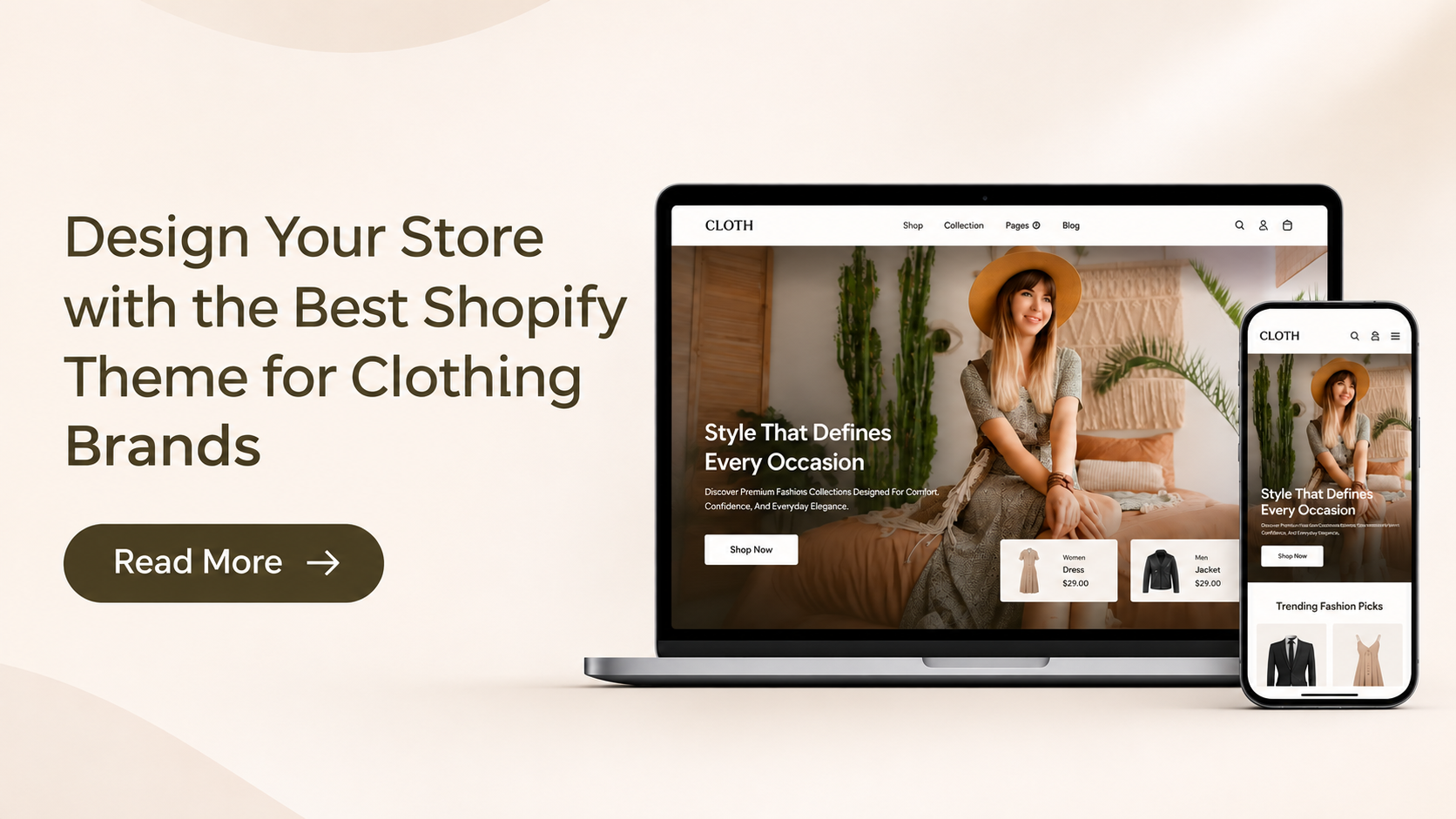
Starting a clothing brand requires more than offering attractive designs and quality products. Your online store should reflect your brand’s personality, present your collections clearly, and make it easy for customers to find the clothing they want. A well-organized storefront can help shoppers understand your products, browse different categories, and make confident purchasing decisions. Choosing the best shopify theme for clothing brand businesses means considering design, customization, and shopping functionality together. Your store needs attractive product displays, clear size and color options, organized collections, and convenient navigation. These elements are especially important for fashion retailers because customers often want to examine product images, compare styles, and check available sizes before purchasing.
For clothing businesses looking for a fashion-focused storefront, the Vestra Fashion Shopify Theme offers a suitable starting point. Exploring Premium Shopify themes can help merchants find professional designs with useful customization and merchandising features. Vestra’s presentation and shopping features help merchants organize apparel collections and create a shopping experience that reflects their brand identity. In this guide, we’ll look at the important features of a clothing store, how Vestra supports fashion retailers, and how to set up your Shopify storefront to make the most of its design.
Why Does Your Clothing Brand Need the Right Shopify Theme?
Your Shopify theme determines how customers see and interact with your online store. Choosing the best Shopify theme for clothing brand websites is important because every section, from the homepage to individual product pages, contributes to the overall shopping experience. For clothing businesses, a theme should do more than display products. It should communicate your brand style, highlight collections, and make product information easy to access. Here are some important reasons to choose the right design for your Shopify clothing store.
1. Create a Consistent Brand Identity
Your storefront should reflect the style and personality of your clothing business. For example, a streetwear brand may prefer bold visuals, while a boutique selling everyday fashion may choose a cleaner and more minimal presentation. Customizable colors, typography, banners, and homepage sections help maintain a consistent appearance throughout your store.
2. Present Clothing Collections Clearly
Customers should be able to find products without browsing through an unorganized catalog. Dedicated collection sections for men’s wear, women’s wear, accessories, new arrivals, and seasonal products make navigation easier. A well-structured storefront also helps merchants highlight their latest designs and popular collections.
3. Make Shopping Convenient on Mobile
Many shoppers browse clothing products through their smartphones. Your storefront should display product images, descriptions, menus, and shopping buttons properly across different screen sizes. Choosing from Shopify responsive themes helps create a mobile-friendly shopping experience and makes it easier for customers to explore collections.
4. Improve Product Discovery
Fashion stores often have products with different sizes, colors, styles, and categories. Product filtering, sorting, and search functionality help customers narrow down their choices. These features become particularly useful as your clothing catalog grows.
5. Support Promotional Campaigns
Clothing brands regularly introduce seasonal collections, discounts, and new product launches. Promotional banners, product badges, and featured product sections can help communicate these campaigns. With customizable storefront sections, merchants can update their homepage according to their marketing requirements.
Vestra Fashion Shopify Theme: A Fashion-Focused Design for Clothing Brands
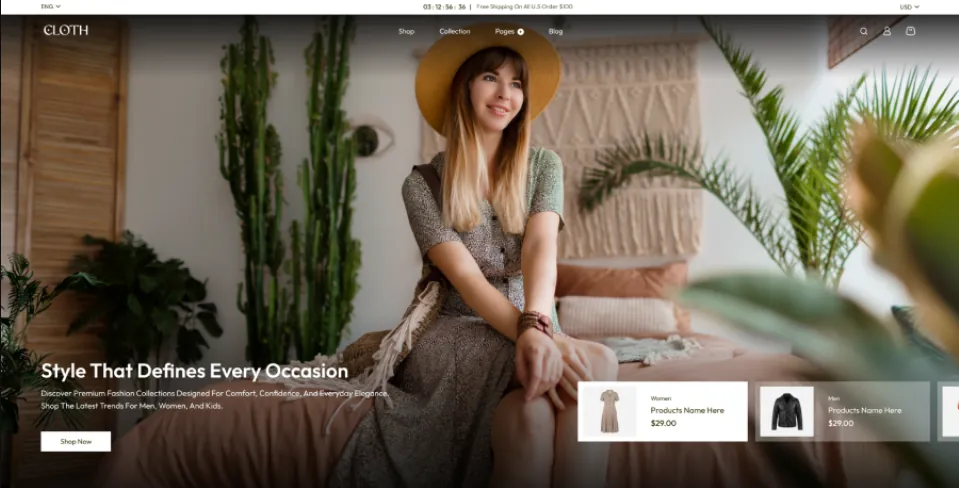
Vestra Fashion Shopify Theme is a fashion-focused preset of the Nexus Shopify theme, designed for clothing businesses that want to present their collections through an attractive and organized storefront. It is a suitable option for merchants looking for the best Shopify theme for clothing brand stores, especially those selling apparel, seasonal collections, and style-focused products. Merchants can use its layouts to highlight new arrivals, showcase featured products, and create dedicated sections for different clothing categories. This helps clothing brands build a storefront that reflects their identity while making their collections easier for customers to browse.
The Nexus Beauty Shopify theme also includes other presets, such as Nexus, Lumia, Arcade, and Delicious, each catering to different store styles and product categories. This gives merchants flexibility to choose a design that aligns with their business needs. For fashion retailers, the Vestra preset offers a suitable starting point, while features such as product filtering, color swatches, enhanced search, mega menu navigation, quick-buy functionality, and customizable sections support a more organized shopping experience. With these features, Vestra can be a practical choice when searching for the best Shopify theme for clothing brand stores.
Price: $240 USD
Key Features
- Fashion-focused storefront design.
- Customizable homepage and collection layouts.
- Size and color variation displays.
- Product filtering and enhanced search.
- Mega menu for easy store navigation.
- Quick-buy functionality for faster shopping.
- Sticky header and cart options.
- Promotional banners, popups, and countdown timers.
- Shopify Trust badges and product labels.
- Stock counter and back-in-stock alerts.
How to Set Up Your Clothing Store Using the Vestra Shopify Theme
Choosing the best Shopify theme for clothing brand stores is only the beginning. Once you have Vestra, the next step is to customize your Shopify theme according to your clothing products, target audience, and business requirements. Follow these steps to create an organized fashion storefront that reflects your brand identity and makes shopping easier for customers.
Step 1: Install the Vestra Theme
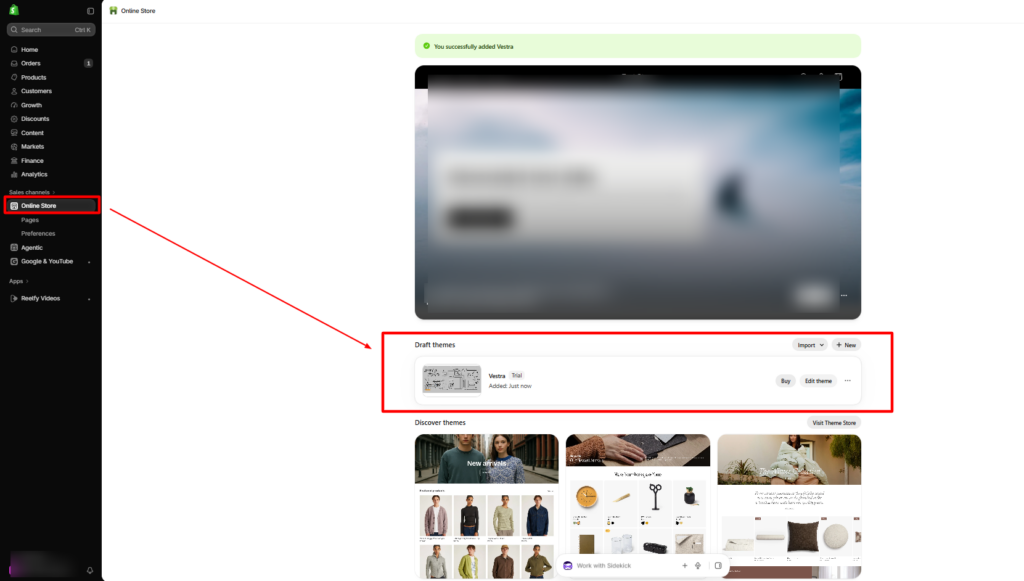
- Log in to your Shopify admin.
- Open Online Store > Themes.
- Add the Vestra theme to your store through its available theme listing or purchase process.
- Once added, locate it in your theme library.
- Click Customize to open the theme editor.
Step 2: Customize Your Store’s Homepage
Your homepage should give visitors a clear idea of what your clothing brand sells. Open the Shopify theme editor and arrange the available sections according to your business needs.
- A hero banner featuring your latest clothing collection.
- A featured collection section for popular products.
- A new arrivals section to highlight recent launches.
- Promotional banners for seasonal offers.
- Brand information to introduce your business.
For example, a women’s clothing store can highlight dresses, tops, and accessories, while a streetwear brand can feature oversized T-shirts, hoodies, and new drops.
Step 3: Organize Your Clothing Collections
Create collections that make your products easier to find. From your Shopify admin:
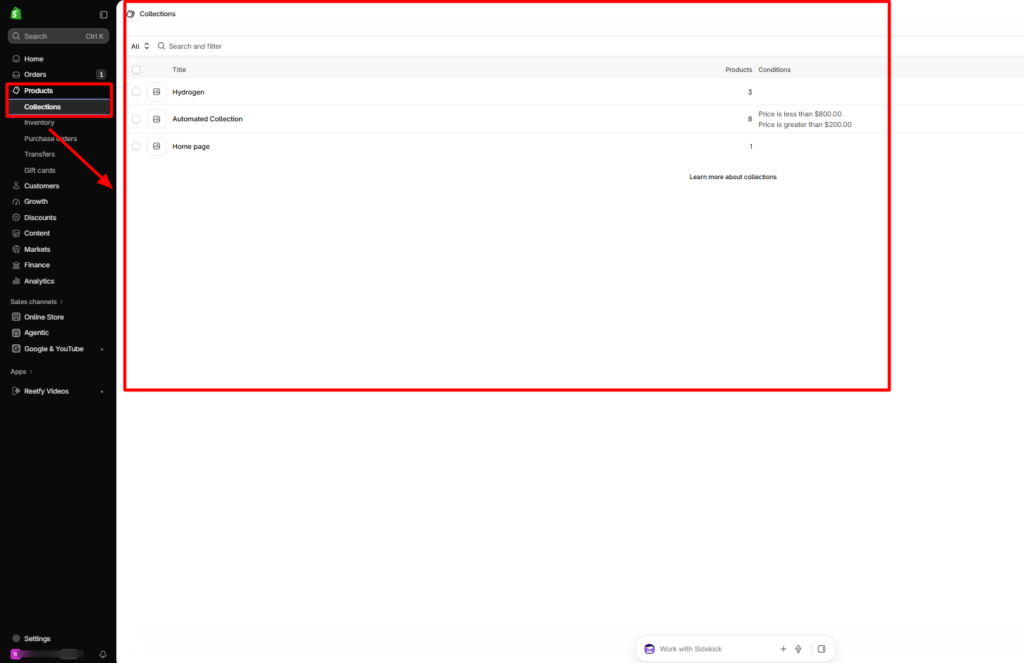
- Go to Products > Collections.
- Click Create collection.
- Enter a suitable collection name.
- Choose a manual or automated collection type.
- Add relevant products.
- Upload a collection image.
- Save your changes.
You can create collections such as:
- Men’s Clothing
- Women’s Clothing
- Dresses and Tops
- Jeans and Trousers
- New Arrivals
- Best Sellers
- Seasonal Collections
Step 4: Add Clothing Products with Complete Details
Product pages should provide enough information for customers to understand what they are purchasing. To add a product:
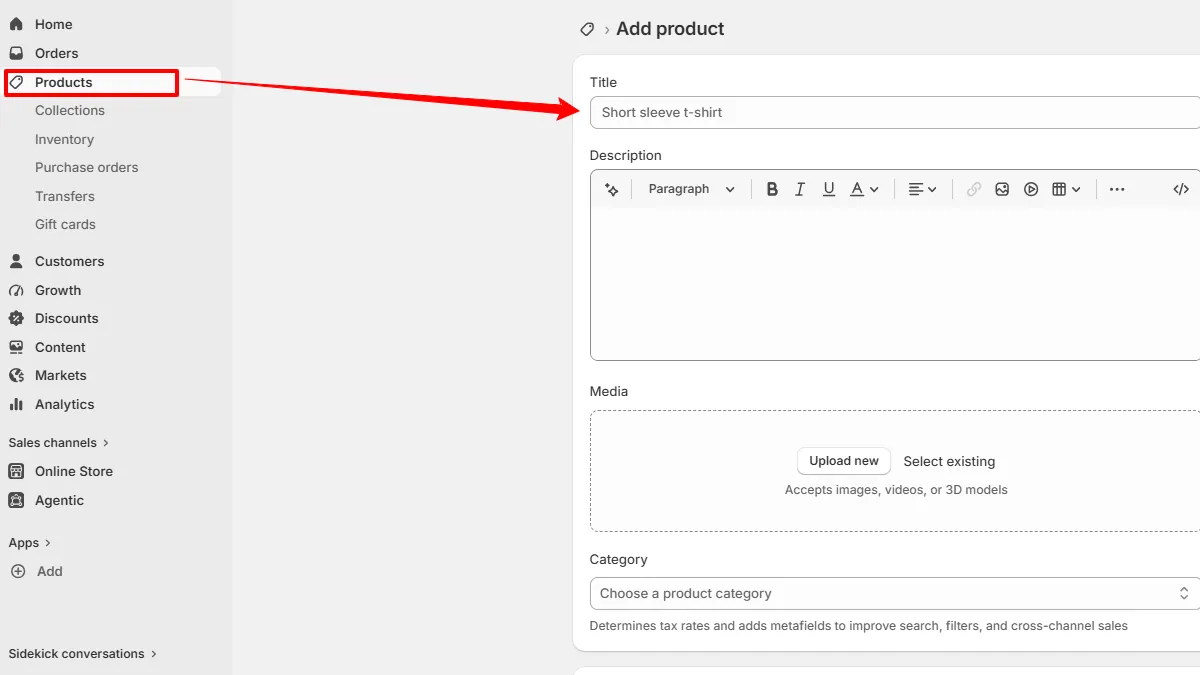
- Open Products in your Shopify admin.
- Click Add product.
- Enter the product title and description.
- Upload clear product images.
- Add the product price.
- Include relevant size and color options.
- Enter inventory information.
- Save the product.
For clothing products, include details such as fabric, fit, available sizes, color options, washing instructions, and care information. Accurate product descriptions help customers make informed decisions.
Step 5: Configure Size and Color Options
Size and color variations are important for fashion retailers because customers need to choose the correct product option. For each clothing product:
- Open the product in your Shopify admin.
- Locate the Variants section.
- Add options such as Size and Color.
- Enter the available values, such as S, M, L, XL, or Black, White, and Blue.
- Review the available combinations.
- Add relevant images and inventory details for variants where applicable.
- Save your changes.
Use the theme’s available swatch and product-option displays to make product selection easier.
Step 6: Set Up Navigation Menus
Your navigation should help customers move between important store pages and clothing categories. Follow these steps:
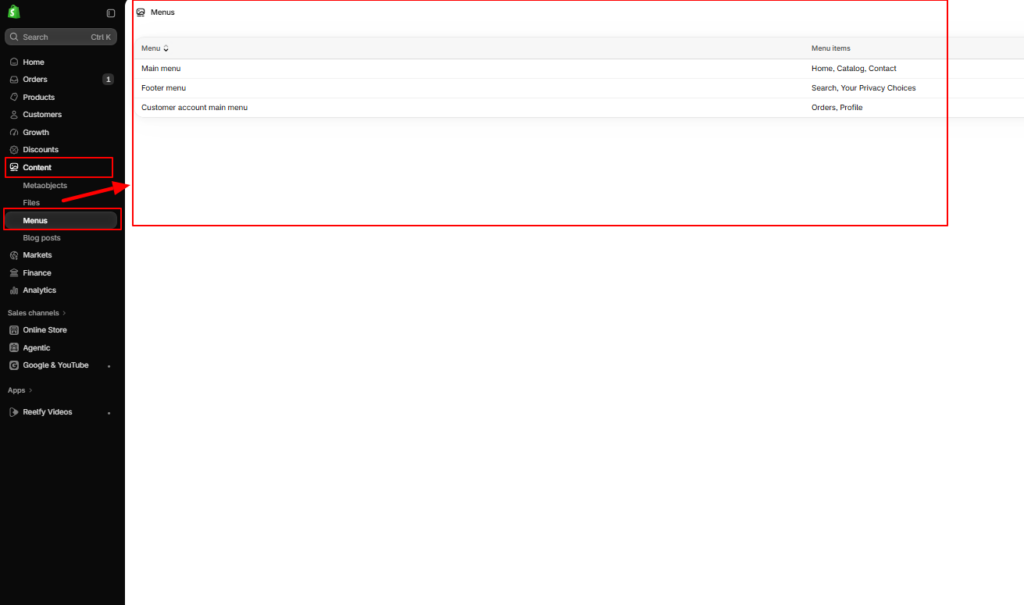
- Open Content > Menus in your Shopify admin.
- Select the main menu.
- Add relevant collection links.
- Organize related categories under suitable menu items.
- Add links to important pages, such as About Us and Contact Us.
- Save the menu.
Step 7: Customize Product and Collection Pages
After organizing your catalog, review how products and collections appear on your storefront. Pay attention to:
- Product image placement and gallery presentation.
- Product titles and descriptions.
- Size and color selection.
- Add-to-cart and quick-buy options.
- Collection filtering and sorting.
- Related product sections.
Step 8: Add Promotional Sections
Promotional content helps clothing brands communicate current offers and new launches. Use available theme sections to highlight:
- New collection launches.
- Seasonal discounts.
- Best-selling products.
- Limited-time offers.
- Featured clothing categories.
Step 9: Customize the Mobile Storefront
Preview your store on different screen sizes before publishing. Check whether:
- Product images display correctly.
- Navigation menus are easy to access.
- Size and color options are readable.
- Buttons are easy to tap.
- Collection pages are easy to browse.
- The cart is accessible.
Step 10: Review Your Store Before Publishing
Before making your clothing store live, check the important pages and shopping functions. Use this checklist:
- Upload your brand logo.
- Review homepage banners and sections.
- Organize product collections.
- Check product descriptions and images.
- Test size and color options.
- Review navigation menus.
- Test product filtering and search.
- Check cart functionality.
- Preview the mobile storefront.
- Review SEO titles, descriptions, and image alt text.
Conclusion
Building a successful clothing store requires a storefront that reflects your brand and makes shopping convenient. Choosing the best shopify theme for clothing brand requirements means looking beyond appearance and considering product presentation, navigation, customization, and mobile usability. The Vestra Fashion Shopify Theme provides a fashion-focused design with features such as customizable sections, color swatches, product filtering, enhanced search, mega menu navigation, and quick-buy functionality. These capabilities give clothing retailers a useful foundation for organizing their collections and presenting products professionally.
Once you add Vestra, focus on creating clear product categories, uploading quality photographs, writing informative descriptions, and customizing your homepage around your target audience. A well-organized store can help customers browse your collections more comfortably and support your clothing brand as it grows.
Ready to build your fashion storefront? Explore Shopify themes for your online store and find a design that supports your online store’s requirements. You can also get help with Shopify design and development services.
Frequently Asked Questions
1. What is the best Shopify theme for a clothing brand?
The best Shopify theme for a clothing brand should offer attractive product layouts, mobile-friendly design, size and color options, product filtering, and easy navigation. Vestra is a fashion-focused option for merchants who want to organize and showcase their apparel collections.
2. Is Vestra suitable for fashion and clothing stores?
Yes. Vestra is designed with a fashion-focused storefront presentation, making it suitable for clothing businesses that want to highlight apparel, seasonal collections, and featured products.
3. What is the price of the Vestra Fashion Shopify Theme?
The Vestra Fashion Shopify Theme is priced at $240 USD, based on the provided theme listing.
4. Can I customize my clothing store with Vestra?
Yes. Merchants can use customizable storefront sections to organize homepage content, highlight collections, and present products according to their brand identity.
5. Does Vestra support product filtering and color swatches?
Yes. Its listed features include product filtering and color swatches, helping customers narrow down clothing options and view available product colors.
6. Why are size charts and color options important for clothing stores?
Size charts help shoppers understand product measurements, while color options make it easier to select their preferred style. Providing clear product variations can reduce uncertainty during shopping.
7. How can I improve the shopping experience on my Shopify clothing store?
Organize products into clear collections, use high-quality images, provide accurate size information, enable convenient product filtering, and make sure your storefront works properly on mobile devices.