

Gift wrapping is a simple yet valuable feature that can make online shopping more convenient and enjoyable for customers. Many shoppers look for gift-ready products when purchasing presents for birthdays, anniversaries, festivals, and other special occasions. Offering a gift-wrapping option allows customers to personalize their orders without arranging additional packaging themselves.
With Nexus Shopify Themes by Sams IT Services, you can offer gift-wrapping functionality directly in your online store, making it easier for customers to choose this option while shopping. In this blog, we will explore how to add and customize Shopify gift wrapping with Nexus Themes and how it can enhance the overall shopping experience.
Benefits of Offering Gift Wrapping in Your Shopify Store
Offering gift wrapping in your Shopify store is more than an additional packaging option. It makes shopping more convenient, attracts gift buyers, and adds value to your products. Customers purchasing gifts for birthdays, anniversaries, festivals, and other occasions can get their orders gift-ready without arranging separate packaging.
Here are some key benefits of offering gift wrapping in your Shopify store.
Improve the Customer Shopping Experience
Gift wrapping makes online shopping more convenient. Customers do not need to purchase wrapping materials or prepare gifts themselves. They can simply select the gift-wrapping option while placing an order, saving time and effort.
Increase Average Order Value
Offering premium gift wrapping at an additional charge creates an opportunity to generate extra revenue. Customers looking for attractive packaging may be willing to pay more for premium wrapping, ribbons, or personalized options.
Attract More Gift Buyers
Many customers shop online specifically to find gifts for friends and family. Providing gift wrapping makes your store more appealing by allowing them to purchase products and prepare them for gifting in one place.
Make Products More Presentable
Attractive packaging makes products look more special and gift-ready. It improves product presentation and creates a better impression, particularly for customers purchasing items for special occasions.
Encourage Seasonal Purchases
Gift wrapping is especially useful during Christmas, Valentine’s Day, Mother’s Day, Diwali, and other celebrations. Offering this option can make your store more attractive to shoppers looking for convenient gifting solutions.
Differentiate Your Store From Competitors
Additional services can help your store stand out in a competitive ecommerce market. Gift wrapping gives customers another reason to choose your store over competitors that offer only standard packaging.
Offer a Personalized Gifting Experience
Depending on the available options, you can offer different wrapping styles, gift messages, or customized packaging. These small touches make purchases more meaningful and create a memorable gifting experience.
Strengthen Your Brand Experience
Thoughtful packaging contributes to how customers perceive your brand. Offering gift wrapping demonstrates attention to customer convenience and helps create a more complete shopping experience.
Overall, gift wrapping is a simple way to add value to your Shopify store. It makes gifting convenient, creates additional revenue opportunities, and improves the customer experience.
How to Add Shopify Gift Wrapping to Your Store With Nexus Themes
Adding a gift-wrapping option to your Shopify store allows customers to prepare their purchases for special occasions without arranging separate packaging. With the Nexus Shopify Themes by Sams IT Services, you can offer this functionality directly on your product pages using the built-in Gift Wrap block. Customers can select the gift-wrapping checkbox while purchasing a product, and the corresponding gift-wrapping product will automatically be added to their cart along with their selected item.
You do not need to manually add gift-wrapping products to individual orders. Once configured, the feature makes the process straightforward for both store owners and customers.
Before getting started, you can also explore Shopify Premium Templates to find a storefront design that supports your business requirements and provides useful ecommerce customization options.
Follow these steps to configure Shopify Gift Wrapping using Nexus Themes.
Step 1: Explore the Nexus Shopify Themes

Start by exploring the collection of Nexus Shopify Themes by Sams IT Services. Choose a theme that matches your store’s product category, branding, and design requirements.
Nexus Beauty Shopify Themes offer storefront customization options that help merchants create functional and visually appealing online stores. Once you find a suitable theme, open its theme page and click on the Try Theme option to add it to your Shopify store.
Before proceeding, make sure you have access to the Shopify admin dashboard where you can customize your theme settings.
Step 2: Open the Shopify Theme Editor
After adding your selected Nexus Theme, navigate to your Shopify admin dashboard to access the theme editor.
Follow these steps:
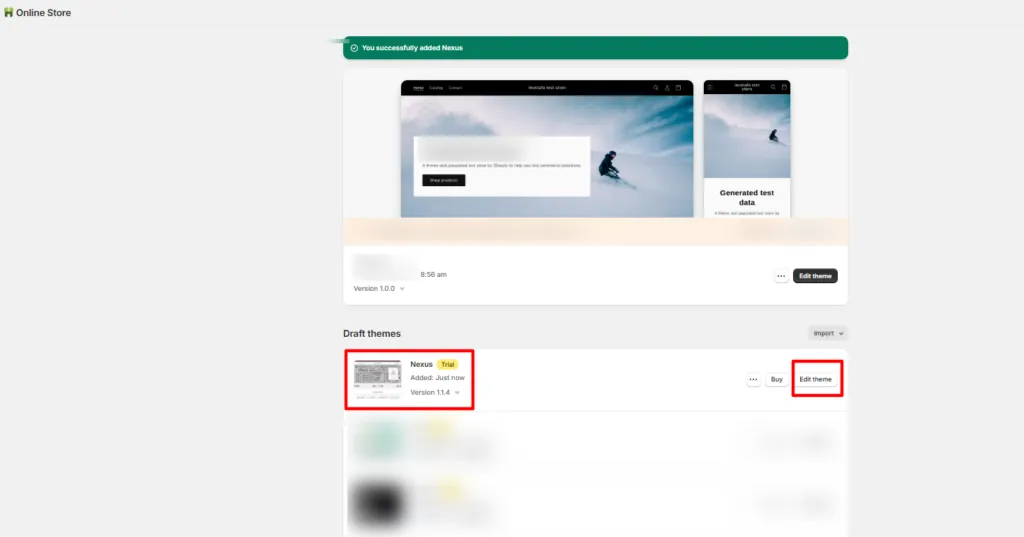
- Log in to your Shopify admin dashboard.
- Navigate to Online Store > Themes.
- Find the Nexus Theme you have added.
- Click on Customize to open the Shopify Theme Editor.
The theme editor allows you to customize different storefront sections, templates, and blocks without editing the theme code. If you want to explore more storefront customization options, read our guide on how to customize a Shopify theme.
From here, you can configure the gift-wrapping functionality on your product pages.
Step 3: Open the Product Page Template
Once the theme editor is open, navigate to the product page template where you want to display the gift-wrapping option.
The product page is where customers view product details, select variants, and add items to their shopping carts. Adding the Gift Wrap block here makes the option visible during the purchasing process.
To proceed:
- Open the page template selector in the theme editor.
- Navigate to Products.
- Select the product page template you want to customize.
- Locate the section or block settings where you can add additional product-page elements.
Now you can add the built-in Gift Wrap block provided by the Nexus Theme.
Step 4: Add the Gift Wrap Block
In the product page template, click on Add Block and select the Gift Wrap block from the available options.
This block displays a gift-wrapping checkbox on your product page, allowing customers to choose whether they want their purchased product gift-wrapped.
After adding the block, you need to configure its settings by selecting the gift-wrapping product that will be added to the cart when customers enable this option.
Step 5: Create a Gift Wrapping Product in Shopify
Before configuring the Gift Wrap block, you need to create a separate product in your Shopify store that represents the gift-wrapping service. This product will be automatically added to the customer’s cart whenever they select the gift-wrapping checkbox.
If you have already created a gift-wrapping product, you can use that product directly. Otherwise, follow these steps:
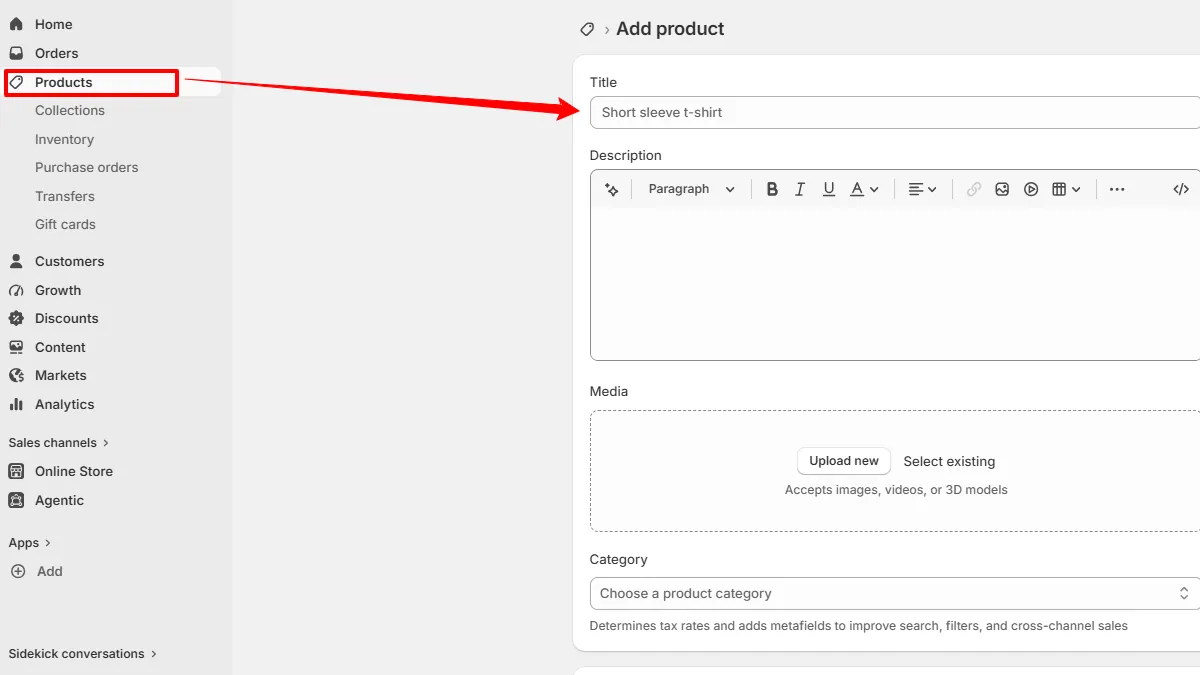
- Go to your Shopify admin dashboard.
- Navigate to Products.
- Click on Add Product.
- Enter the product title as Gift Wrapping.
- Add a product description explaining the gift-wrapping service.
- Upload an image showing your gift-wrapping packaging, if available.
- Set the price for the gift-wrapping service. You can offer it for free or charge an additional amount.
- Make sure the product is available for purchase through your online store.
- Click Save to create the product.
Creating a separate product makes it easier to manage gift-wrapping charges and track how many customers purchase this additional service. You can also explore Shopify food store designs if you operate a bakery, specialty food business, or gift hamper store where attractive packaging can improve product presentation.
Step 6: Select the Gift Wrapping Product in the Gift Wrap Block
Once your gift-wrapping product is ready, return to the Nexus Theme Editor and open the product page template where you previously added the Gift Wrap block.
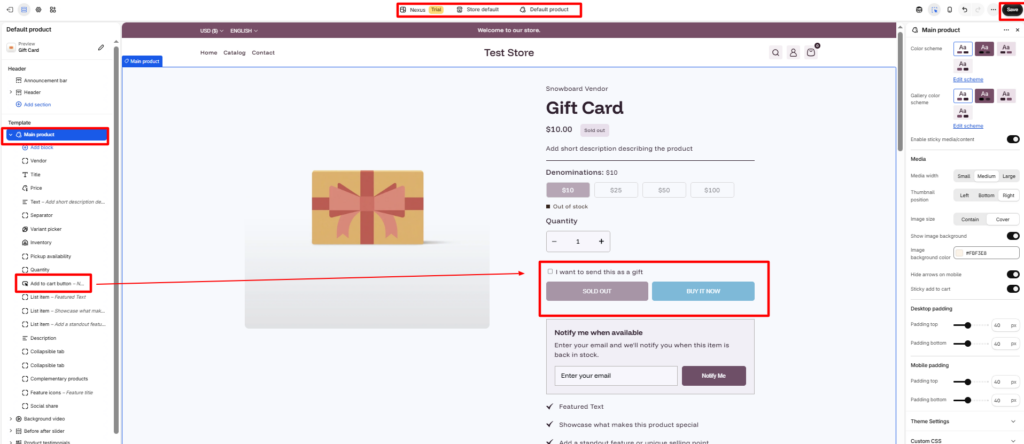
Now configure the block settings:
- Select the Gift Wrap block.
- Locate the product selection setting.
- Choose the Gift Wrapping product you created earlier.
- Review the available settings and adjust them according to your store requirements.
- Click Save to apply the changes.
By selecting the gift-wrapping product, you connect the checkbox displayed on the product page with the actual product in your Shopify catalogue.
Step 7: Preview and Test the Shopify Gift Wrapping Feature
After configuring the Gift Wrap block, preview your product page to ensure everything works correctly. The gift-wrapping checkbox should now appear on the product page, allowing customers to choose the additional service while purchasing their products.
To test the functionality:
- Open your Shopify storefront.
- Navigate to a product page where the Gift Wrap block is enabled.
- Select the gift-wrapping checkbox.
- Add the product to your cart.
- Open your cart or slide-out cart.
- Verify that both the purchased product and the Gift Wrapping product are added.
When customers select the gift-wrapping checkbox, the Nexus Theme automatically adds the configured gift-wrapping product to the cart along with the product they intend to purchase.
If customers do not select the checkbox, the gift-wrapping product will not be added through this option.
This makes the Shopify Gift Wrapping experience simple and convenient. Customers can select the service directly from the product page without contacting the store owner or requesting special packaging separately.
How Nexus Themes Simplify Shopify Gift Wrapping
With Nexus Shopify Themes by Sams IT Services, merchants can integrate gift-wrapping functionality into their storefront through a dedicated Gift Wrap block. Instead of relying on a separate gift-wrapping app for this particular functionality, store owners can configure the feature using the theme editor and an existing Shopify product.
Some key advantages include:
- Simple configuration: Add the Gift Wrap block directly to your product page.
- Product-based pricing: Select a dedicated gift-wrapping product and configure its price.
- Convenient selection: Customers can choose gift wrapping through a checkbox.
- Automatic cart addition: The selected gift-wrapping product is added to the cart with the purchased product.
- Better shopping experience: Customers can arrange gift packaging while placing their orders.
The Nexus theme family includes gift wrapping as a listed cart and checkout feature across its presets. You can explore the Shopify themes available for purchase and their available features to see how the functionality fits into your store.
Additionally, selecting a responsive storefront design ensures that customers can access product details and gifting options across different devices. Explore our guide to Shopify Responsive Themes to learn more about creating a smooth shopping experience on mobile phones, tablets, and desktops.
Conclusion
Offering gift wrapping is a simple way to make your Shopify store more convenient for customers while creating additional revenue opportunities. With the built-in Shopify Gift Wrapping feature in Nexus Themes by Sams IT Services, merchants can easily add a gift-wrapping option to their product pages.
By adding the Gift Wrap block, selecting a dedicated gift-wrapping product, and saving the theme settings, you can allow customers to include gift wrapping with their purchases. This functionality eliminates the need for complicated configurations and improves the overall shopping experience.
Explore Nexus Shopify Themes and make gift-ready shopping easier for your customers with convenient storefront features and customization options.
Frequently Asked Questions (FAQs)
1. What is Shopify Gift Wrapping?
Shopify Gift Wrapping allows customers to select an additional gift-packaging service while purchasing products from an online store.
2. How can I add gift wrapping to my Shopify store?
You can add gift wrapping using a compatible Shopify theme, a dedicated gift-wrapping product, or a third-party app.
3. Do Nexus Shopify Themes support gift wrapping?
Yes, Nexus Shopify Themes by Sams IT Services include a built-in Gift Wrap block that allows merchants to offer gift-wrapping options on product pages.
4. How do I enable gift wrapping with Nexus Themes?
Open the Shopify Theme Editor, navigate to the product page template, add the Gift Wrap block, and select your gift-wrapping product in its settings.
5. Do I need to create a separate gift-wrapping product?
Yes, you need to create a separate Shopify product named Gift Wrapping if you do not already have one. You can select this product in the Gift Wrap block settings.
6. Can I charge customers for gift wrapping?
Yes, you can set a price for your gift-wrapping product. Customers will be charged the configured amount when they select the gift-wrapping option.
7. Does the gift-wrapping product automatically get added to the cart?
Yes, when customers select the gift-wrapping checkbox, the configured gift-wrapping product is automatically added to their cart along with the purchased product.
8. Can I offer free gift wrapping in my Shopify store?
Yes, you can set the price of your dedicated gift-wrapping product to zero to offer free gift wrapping.
9. Where does the gift-wrapping option appear in my Shopify store?
With Nexus Themes, the Gift Wrap block displays a gift-wrapping checkbox on the product page, allowing customers to select the service before adding products to their cart.
10. Can I customize the gift-wrapping option in Nexus Themes?
Yes, you can configure the Gift Wrap block through the Shopify Theme Editor by selecting the gift-wrapping product and adjusting the available settings.