
A Shopify blog can do more than share company updates or introduce new products. It can answer customer questions, attract people searching for useful information, and guide potential buyers toward products that meet their needs. However, publishing articles regularly does not guarantee that people will find them through search engines. Shopify blog SEO helps you organize, write, and optimize blog content so search engines can understand its purpose and readers can find useful answers. It involves researching the right topics, creating helpful articles, improving page titles and headings, linking related pages, and checking technical performance.
For Shopify merchants, a well-planned blog can support product discovery while bringing relevant visitors to the store. This guide explains how to improve your blog’s search visibility, maintain existing content, and measure whether your SEO efforts are producing results.
What Is Shopify Blog SEO?
Shopify blog SEO is the process of optimizing blog posts published on a Shopify store to improve their visibility in organic search results. It includes content planning, keyword placement, page formatting, internal linking, image optimization, and technical checks. For example, a skincare store could publish an article about building a daily skincare routine. By answering common questions and linking to relevant cleansers, moisturizers, and sunscreens, the article can help readers understand their options before visiting product pages.
Blog SEO does not guarantee a particular ranking. Search engines consider many signals, including content relevance, usefulness, website accessibility, and competition. The aim is to create pages that satisfy search intent and are easy for both visitors and search engines to understand.
Why Is Shopify Blog SEO Important?
Blog content can support several parts of an ecommerce marketing strategy.
- Attract Relevant Organic Traffic: People often search for advice before deciding what to buy. Articles that answer these questions can introduce your store to visitors who may not know your brand yet. For instance, an electronics merchant could write about choosing headphones for remote work. Readers looking for buying advice may then visit relevant product pages through contextual links.
- Support Product Discovery: Blog posts provide space to explain product features, compare options, and answer questions that may not fit naturally on a product page. Relevant links help readers move from general information to specific products when they are ready.
- Build Trust With Useful Information: Detailed, accurate articles can help customers understand your products and make informed decisions. Original examples, clear explanations, credible references, and practical advice make content more useful than pages created only to target keywords.
- Strengthen Your Website’s Content Structure: Related blog posts can link to relevant collections, products, and other guides. These connections help readers find additional information and give search engines more context about how pages relate to one another.
How to Get Better Search Results From Your Shopify Blog
1. Research Keywords Before Writing
Keyword research helps you understand what your audience wants to know and how they describe their problems. Instead of choosing a topic based only on what your business wants to discuss, look for questions and searches connected to your products and industry. Start with these steps:
- Identify the main topics related to your products.
- Use keyword research tools to find relevant search terms.
- Review related questions and longer, more specific phrases.
- Check the search intent behind each keyword.
- Compare competing pages to identify missing information.
- Select one primary keyword and a group of closely related terms.
For example, a home decor store might research terms such as “how to style a small living room,” “living room decor ideas,” and “how to choose a coffee table.” These searches may support different articles because each addresses a slightly different need. Check the search results before deciding whether to create separate posts or combine closely related topics into one comprehensive guide.
Tip: Do not choose keywords based on search volume alone. A specific query with modest demand may be more relevant to your products than a broad term that attracts visitors who are unlikely to buy.
2. Match the Content to Search Intent
Search intent describes what someone hopes to accomplish when entering a query. Understanding it helps you decide what information an article should contain. Common search intents include:
- Informational: The reader wants an explanation, tutorial, or answer.
- Commercial investigation: The reader is comparing products, features, or alternatives.
- Transactional: The reader is ready to take an action, such as purchasing a product.
A query such as “how to clean white sneakers” calls for practical instructions. A search for “best running shoes for beginners” may require comparisons, selection criteria, and product recommendations. Review the pages already appearing for your target query. Look at their formats, headings, examples, and level of detail. Use that information to understand the reader’s expectations, then create an original article that addresses the topic more clearly or covers useful points competitors have missed. Avoid turning every article into a sales page. Give readers the information they came for, and introduce relevant products only when they help answer the question.
3. Create a Clear Article Structure
A well-organized article is easier to scan, read, and maintain. Before writing, prepare an outline that moves logically from the reader’s main question to supporting details and practical next steps. Use a single clear H1 for the main article title, followed by H2 headings for major sections. Add H3 headings when a section needs smaller subsections. For example:
- H1: How to Choose the Right Face Moisturizer
- H2: Understand Your Skin’s Needs
- H2: Compare Common Moisturizer Ingredients
- H2: How to Apply Moisturizer
- H2: Common Mistakes to Avoid
- H2: Frequently Asked Questions
Keep paragraphs focused, use numbered steps for instructions, and use bullet points for short lists. Add a table only when readers genuinely benefit from comparing information side by side. A clear structure also helps you identify gaps in the article before publication. Each heading should introduce information that supports the main topic rather than repeating an earlier section.
4. Optimize the Page Title and Meta Description
The page title and meta description help communicate what an article covers when it appears in search results. Your title should describe the topic accurately and give readers a reason to click. Include the primary keyword naturally when it fits, but avoid awkward repetition or exaggerated promises. For example:
- Page title: Shopify Blog SEO: Tips to Improve Search Rankings
- Meta description: Improve Shopify SEO with keyword research, content optimization, internal linking, technical checks, and practical ways to grow organic traffic.
Write a distinct title and description for every important article. The description should summarize the page rather than repeat the same keyword several times. In Shopify, you can edit these details by opening Content > Blog posts, selecting the article, and using the search engine listing editor. Shopify’s documentation explains how to update the page title, meta description, and URL handle. Remember that search engines may generate a different title link or snippet based on the page content and the search query. These fields help guide how the page is presented, but they do not guarantee that the exact text will appear.
5. Use the Primary Keyword Naturally
Your primary keyword should help establish the article’s subject without making the writing sound repetitive. Place it in relevant locations, such as:
- The main page title, where appropriate.
- The introduction.
- One or more relevant headings, if they read naturally.
- The body content where it adds context.
- The meta title and description when suitable.
- The URL handle, if it creates a clear and concise address.
Use related phrases and natural variations throughout the article. For example, a post targeting Shopify blog SEO might also discuss blog content optimization, keyword research, internal links, and organic search performance. There is no universal keyword density that guarantees better rankings. Repeating a phrase simply to reach a percentage can reduce readability and make the content feel unnatural. Instead, check whether the article answers the topic thoroughly, uses accurate terminology, and provides enough context for readers to understand the advice.
6. Add Relevant Internal Links
Internal links connect a blog post to other pages on the same website. They help readers continue their journey and give search engines additional context about the relationship between pages. For a Shopify store, useful internal links may point to:
- Related blog posts and buying guides.
- Relevant product pages.
- Product collections.
- Tutorials or resource pages.
- Store policies or supporting information when relevant.
For example, an article about choosing a Shopify theme could link to a guide about store design and a relevant collection of premium Shopify themes. Use descriptive anchor text that tells readers what they will find after clicking. A phrase such as “premium Shopify themes” is generally more informative than “click here.” Add links where they provide useful context. Avoid inserting unrelated links into every paragraph or using the same exact-match anchor text repeatedly across multiple pages. Also review older blog posts when publishing a new article. If an existing article discusses the same subject, add a link to the new resource when it genuinely helps readers.
7. Optimize Images for Search and Usability
Images can explain a process, illustrate a product, or make a long article easier to follow. However, large or poorly prepared files can affect page loading, so image optimization should be part of your publishing process. Follow these practices:
- Use original images, screenshots, or illustrations when possible.
- Choose image dimensions suitable for the layout.
- Compress files to reduce unnecessary file size.
- Use descriptive filenames rather than generic names.
- Add meaningful alt text that describes the image’s purpose.
- Avoid placing essential instructions only inside an image.
- Check how images display on mobile devices.
For example, shopify-blog-seo-settings.jpg is more descriptive than IMG_1045.jpg for an image showing blog SEO settings. Alt text should describe the actual image for people using assistive technology. It is not a place to insert a list of target keywords. Where supported by the theme and implementation, responsive images and lazy loading for below-the-fold content can also help manage page performance. Avoid lazy-loading the main image when doing so would delay its appearance unnecessarily.
8. Improve the Blog’s Mobile Experience
Many shoppers browse stores on phones, so blog posts should be comfortable to read on smaller screens. Check the published article on a mobile device and review:
- Whether the text is readable without zooming.
- Whether headings and paragraphs have enough spacing.
- Whether images fit the screen without awkward cropping.
- Whether tables can be viewed or scrolled easily.
- Whether links and buttons are easy to tap.
- Whether navigation and promotional elements interrupt reading.
- Whether the page loads without unnecessary delays.
Your Shopify theme plays an important role in how blog content is displayed. As part of your Shopify blog SEO strategy, review the blog template, typography, spacing, and image behavior rather than assuming that a mobile-responsive storefront automatically provides a good reading experience. If your current design makes articles difficult to navigate, explore different theme settings or buy Shopify themes that offer a clean, reader-friendly blog layout. You can compare options like Nexus, Lumia, and Delicious, then test the actual demo and mobile experience before making a decision.
9. Review Technical SEO and Indexing
Even useful content can struggle to appear in search results if search engines cannot access or index it properly. Technical checks help identify issues that may prevent a blog post from being discovered or understood. Review these areas:
- Indexing: Use Google Search Console to check whether important blog URLs are indexed. If a page is not indexed, inspect the reported reason instead of repeatedly submitting the same URL.
- Canonical URLs: Check that the page identifies the intended canonical URL, especially if similar content is accessible through multiple URLs. Avoid adding canonical tags without understanding how they affect the page.
- Redirects: If you change an established blog URL, configure a suitable redirect from the old address. Shopify provides a redirect option when editing a blog post’s URL handle.
- Duplicate content: Avoid publishing multiple pages that provide substantially the same information without a clear purpose. Consolidate overlapping articles when that creates a more useful resource.
- Page performance: Review loading speed, layout stability, and interaction responsiveness. Large images, unnecessary scripts, and excessive third-party apps can affect the experience.
- Structured data: Check whether your theme already outputs appropriate article markup. Correct structured data can help search engines understand a page, but it does not guarantee enhanced search appearances.
10. Update Older Blog Posts
A blog post can lose usefulness when product details change, links stop working, or recommendations become outdated. Regular reviews help keep the information accurate and relevant. Use Google Search Console and your analytics platform to identify articles that receive impressions but few clicks, have lost traffic, or no longer meet the needs of readers. When reviewing an article:
- Check whether the information is still accurate.
- Update outdated product details, screenshots, prices, or instructions.
- Add missing information that readers need.
- Replace broken links and verify existing references.
- Improve the title or introduction if it does not clearly describe the article.
- Add relevant internal links to newer resources.
- Remove repetitive content that does not contribute value.
Do not change a publication date merely to make an article appear fresh. Update the page when you have made meaningful improvements, and display publication or modification dates accurately where applicable. Some articles may need only a small correction, while others may benefit from a substantial rewrite. Base the decision on the article’s current quality, search performance, and relevance to your audience.
How to Set Up SEO-Friendly Blog Posts in Shopify
Setting up an SEO-friendly blog involves more than writing content and adding keywords. Shopify blog SEO also depends on your theme, page structure, image optimization, and search engine settings. Follow these steps to prepare your blog posts for publication and improve their chances of appearing in relevant search results.
Step 1: Choose an SEO-Friendly Shopify Theme
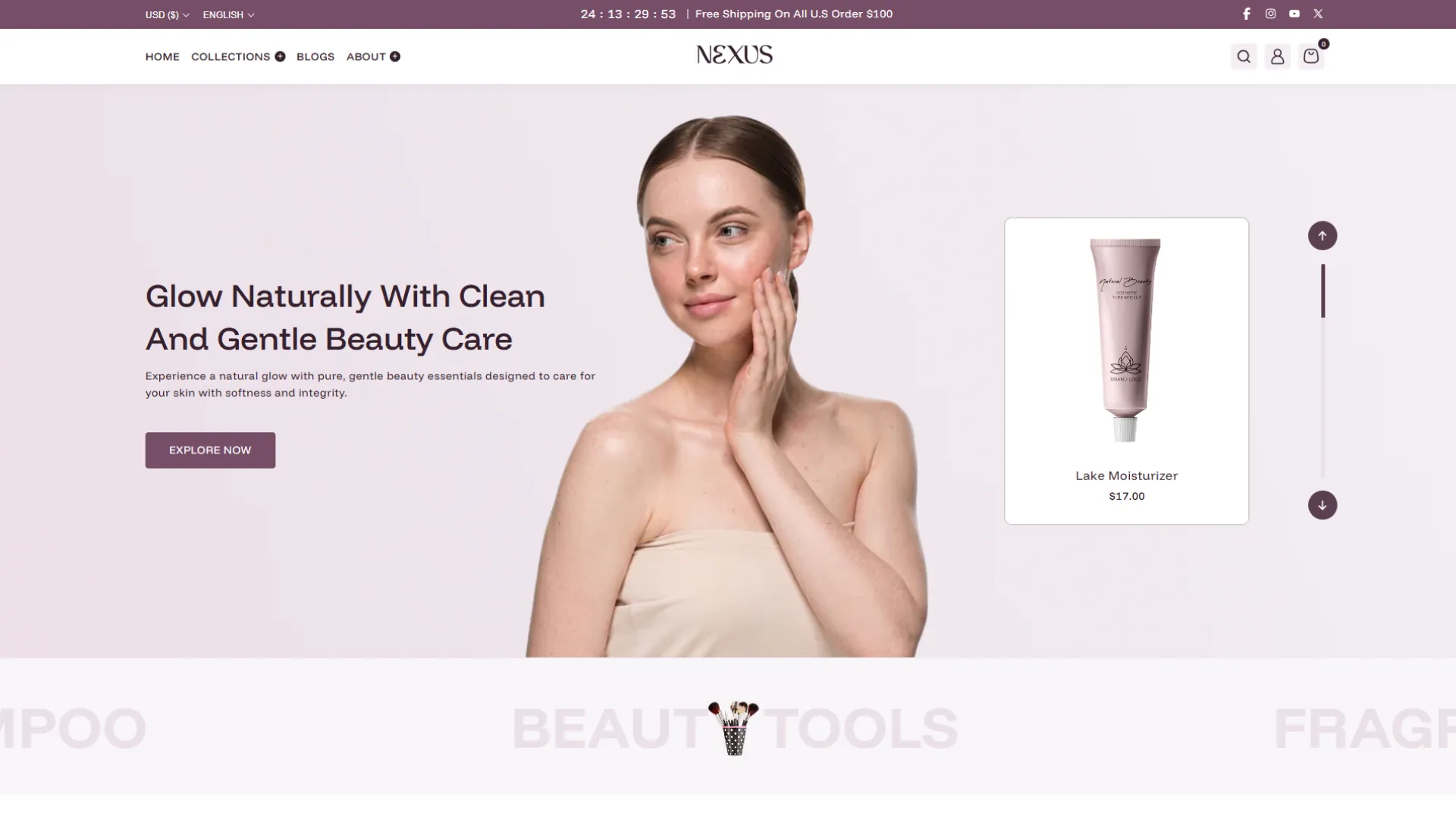
Start with a Shopify theme that supports a clear content layout, responsive design, and easy navigation. The Nexus Shopify theme is an option to consider when building a storefront that needs organized content and a mobile-friendly shopping experience. Its features include a sticky header, enhanced search, and a mega menu, which can help visitors navigate the store. Before choosing a theme, preview its blog layout on desktop and mobile, check how it displays headings and images, and test its loading performance. A theme alone does not guarantee better rankings, so review its overall usability and technical setup as well.
Step 2: Create or Open a Blog Post
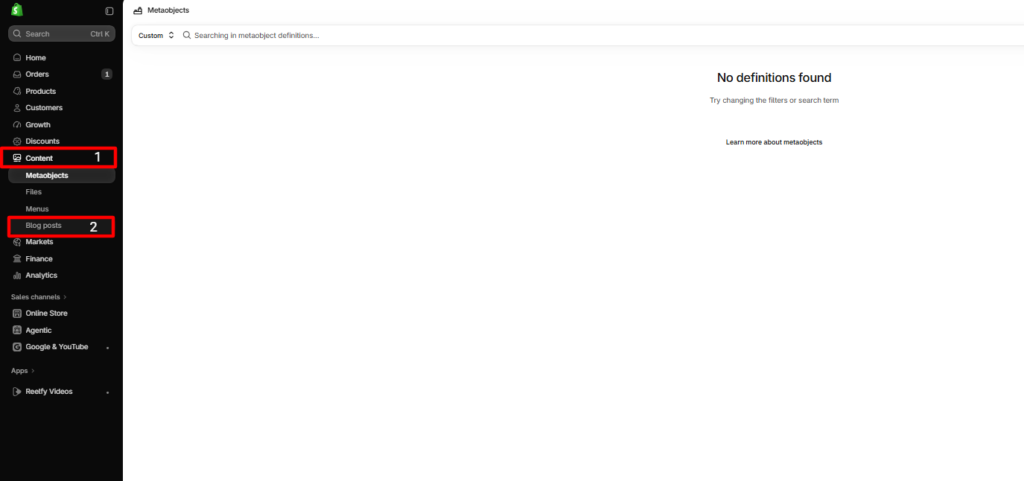
In your Shopify admin, go to Content > Blog posts. Create a new article or open an existing post that needs improvement. Choose a topic based on your audience’s questions and prepare an outline before writing.
Step 3: Write and Structure the Content
Answer the main search query clearly and organize the article with descriptive H2 and H3 headings. Keep paragraphs focused, use lists when they make instructions easier to follow, and include relevant examples. Link to related products, collections, and blog posts where they provide additional value.
Step 4: Edit the Search Engine Listing
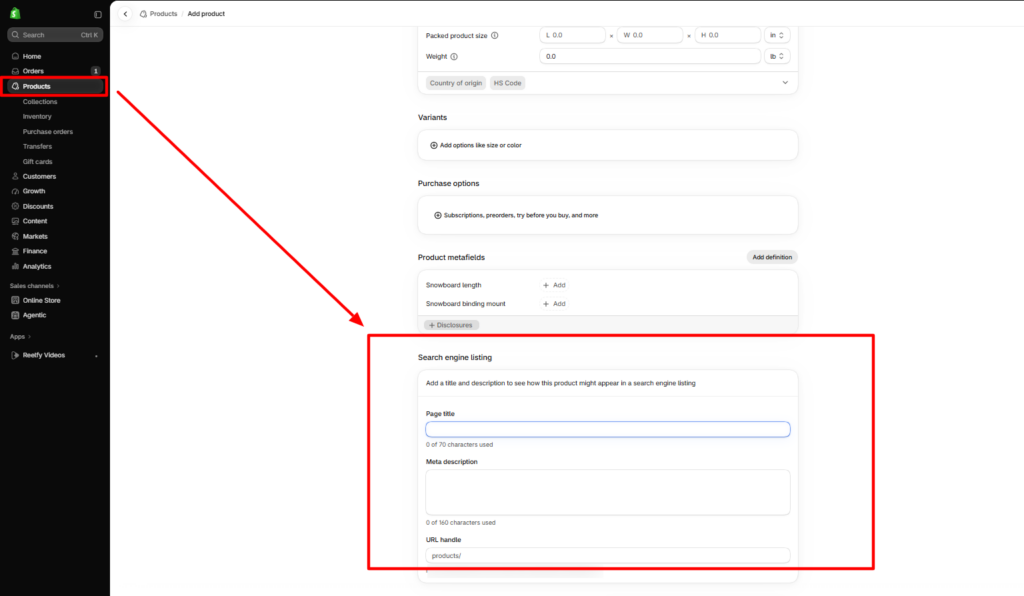
Open the search engine listing section in the blog post editor. Add a relevant page title, a concise meta description, and a readable URL handle. Include your primary keyword naturally where appropriate. If you change an existing URL, set up a redirect from the old address to the new one.
Step 5: Optimize Images and Internal Links
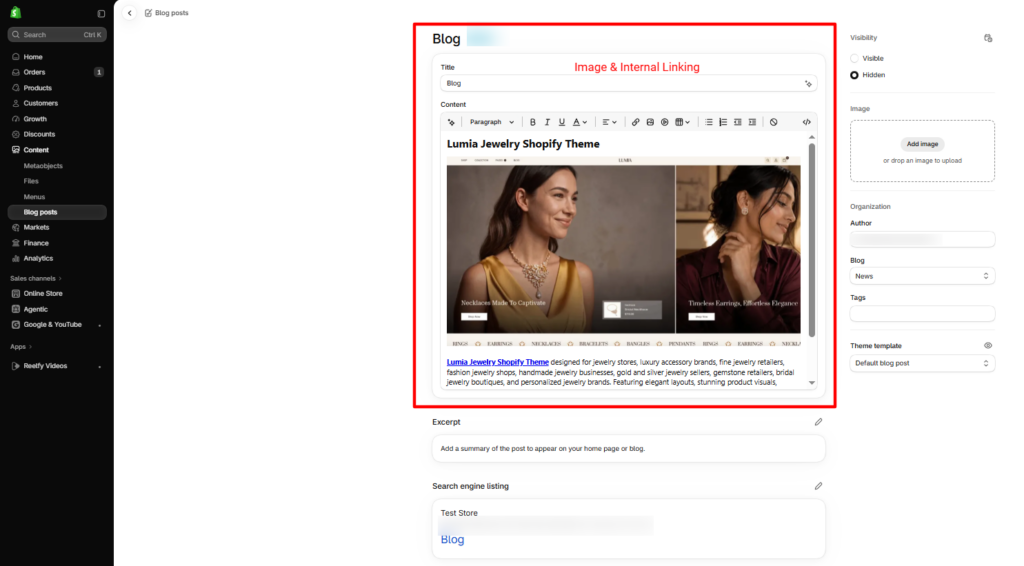
Add relevant images, compress them where necessary, and write descriptive alt text. Include internal links to related articles, product pages, and collections so readers can find useful information and relevant products without having to search for them separately.
Step 6: Preview and Publish the Article
Preview the article on desktop and mobile devices. Check the heading structure, spacing, image display, links, spelling, and navigation. Once everything looks correct, publish the post and use Google Search Console to monitor indexing, impressions, clicks, and search queries over time.
How to Measure Shopify Blog SEO Performance
Publishing an article is only the first step. Measuring its performance helps you understand what attracts readers and where improvements may be needed.
Google Search Console
Google Search Console helps you monitor how your blog posts perform in Google Search. Review clicks to see how many users visit your pages, impressions to understand how often they appear in search results, click-through rate (CTR) to measure how frequently users click after seeing your pages, and average position to track their visibility. You can also check search queries, inspect individual URLs, and identify indexing issues. Compare performance across similar periods and consider seasonal trends before deciding which SEO improvements to make.
Google Analytics
Use Google Analytics to understand what visitors do after reaching your blog. Relevant metrics include organic landing-page sessions, engagement, product-page visits, and conversions. For an ecommerce business, a blog’s value is not limited to pageviews. A post that brings a smaller number of relevant visitors who continue to product pages may be more useful than one that attracts large amounts of unrelated traffic.
Create a Simple Tracking Sheet
Maintain a spreadsheet with these columns:
| Metric | What to Record |
|---|---|
| Blog URL | Published article address |
| Primary keyword | Main search term |
| Impressions | Search visibility |
| Clicks | Search traffic |
| CTR | Clicks divided by impressions |
| Organic sessions | Visits from organic search |
| Conversions | Purchases or other tracked goals |
| Last updated | Date of the most recent meaningful revision |
Review the sheet regularly and prioritize articles where an improvement could make a meaningful difference. For example, a post with rising impressions but a low CTR may need a clearer title, while a post with declining traffic may require a content and ranking review.
Conclusion
Effective Shopify blog SEO requires more than adding keywords to an article. It involves understanding what customers search for, publishing useful content, organizing information clearly, improving page titles, connecting related pages, and maintaining a technically accessible website. Start with a few practical actions: research the search intent behind your main topics, optimize your most important articles, add relevant internal links, and review their performance in Google Search Console. Update older posts when you can make them more accurate or helpful.
With a consistent process, your blog can become a useful part of your ecommerce strategy by answering customer questions, supporting product discovery, and attracting relevant organic visitors over time.
Frequently Asked Questions
1. How do I optimize a Shopify blog post for SEO?
Research the target keyword and search intent, write useful content, organize it with descriptive headings, edit the meta title and description, add relevant internal links, optimize images, and check indexing after publishing.
2. Does blogging help Shopify stores rank on Google?
Blogging can help Shopify stores attract organic traffic by answering relevant questions and covering topics related to their products. Results depend on content quality, competition, technical accessibility, and other ranking factors.
3. Where can I edit SEO settings for a Shopify blog post?
Go to Content > Blog posts in Shopify admin, open the relevant article, and edit the search engine listing. You can update the page title, meta description, and URL handle.
4. How often should I update Shopify blog posts?
Review important articles periodically and whenever product information, instructions, or industry details change. Update content when you can improve its accuracy, relevance, or usefulness rather than changing it just to make it look new.
5. How long does Shopify blog SEO take to show results?
There is no fixed timeline. Search engines need to crawl and process pages, and rankings depend on competition, content relevance, site quality, and other factors. Monitor impressions, clicks, and organic visits over time to evaluate progress.
6. Should every Shopify blog post target a different keyword?
Each article should have a clear primary topic and search intent. Closely related keywords can fit naturally within one post, while separate articles make sense when they address meaningfully different questions or needs.
7. Does Shopify automatically handle blog SEO?
Shopify provides useful SEO features, including editable search listings and URL management, along with some automatically generated SEO elements. Merchants still need to create helpful content, manage internal links, review indexing, and check their store’s technical setup.