Background Video Section – Nexus
The Background Video section in Nexus delivers a high-impact visual experience by blending cinematic motion with elegant content layering.
Designed specifically for beauty brands, this section helps create an emotional connection, elevate brand perception, and instantly draw visitors into your story.
Ideal for hero campaigns, luxury product reveals, skincare rituals, or lifestyle storytelling.
Features of the Background Video Section :
- Cinematic full-width video canvas that instantly elevates brand presence.
- Smart overlay control ensures perfect text readability without dulling visuals.
- Content-first layering system keeps headlines and CTAs visually dominant.
- Adaptive height intelligence automatically balances video impact across screen sizes.
- Mobile-optimized fallback handling for smooth performance on all devices.
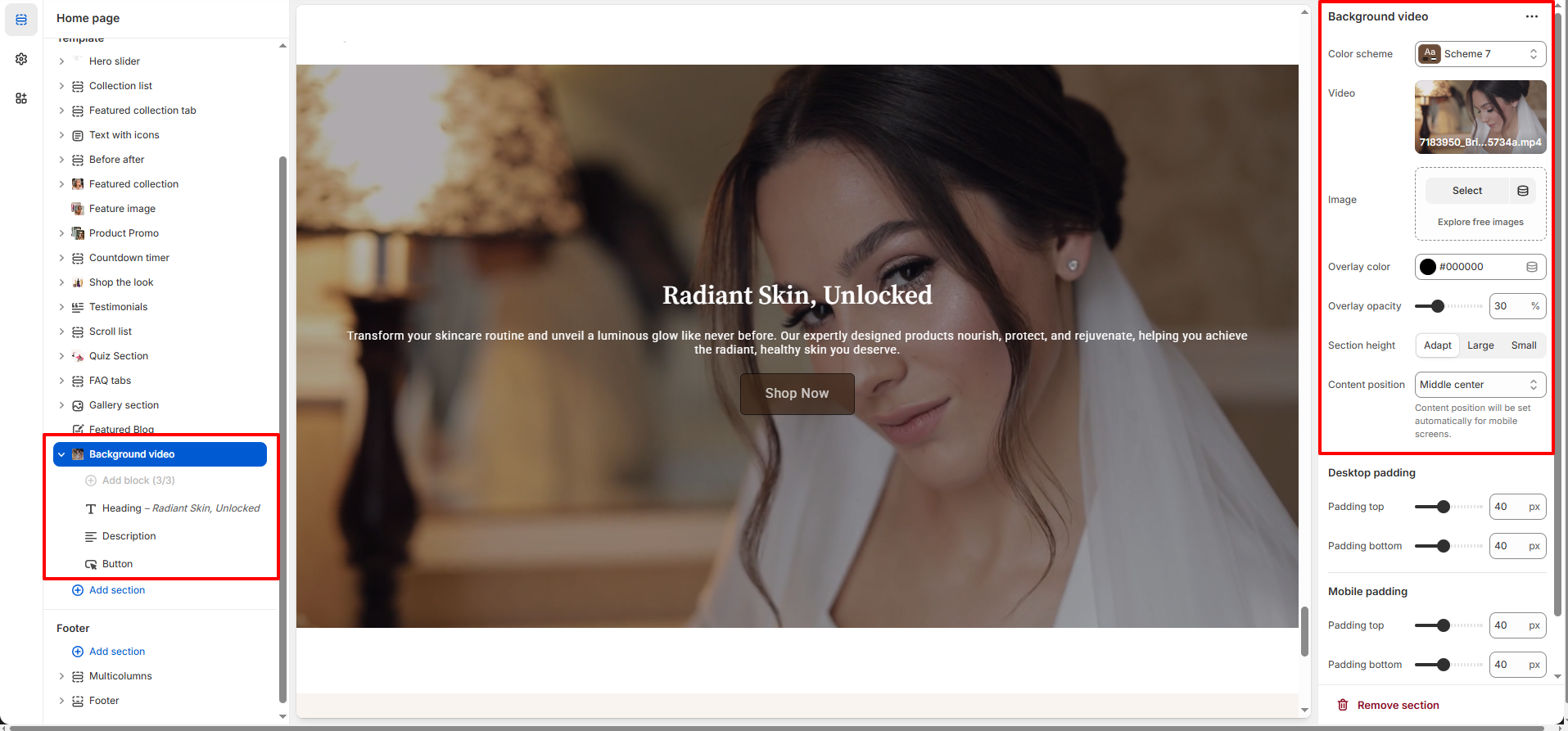
How to Set Up the Background Video Section :
- Go to Online Store → Themes → Customize.
- Click Add section and select Background Video from the section list.
- In the settings panel, configure the following.

Background Video Settings :
- Color Scheme : Choose a predefined color scheme to match your store’s branding.
- Video : Upload a background video to create an immersive, motion-driven hero experience that instantly captures attention.
- Image (Fallback) : Choose a fallback image that displays while the video loads or on devices where video playback is limited, ensuring a smooth experience.
- Overlay Color : Apply an overlay color on top of the video to enhance text contrast and maintain visual clarity.
- Overlay Opacity : Control the strength of the overlay to balance readability and visual depth without hiding the video.
-
Section Height :
- Adapt – Adjusts height automatically based on content
- Large – Creates a bold, cinematic impact
- Small – Keeps the section compact and refined
-
Content Position : Position text and buttons precisely over the video for optimal
focus.
Content alignment automatically adjusts for mobile devices.
Background Video Section Block
-
Heading Block Settings :
- Heading : Enter the main headline text displayed prominently over the background video. Best used for strong brand statements or campaign titles.
-
Description Block Settings :
- Description : Add supporting copy beneath the heading to communicate product benefits, brand values, or key messaging.
-
Button Block Settings :
- Button Label : Define the call-to-action text (e.g., Shop Now).
- Button Link : Paste a URL or search for a page, product, or collection to link the button.
- Open Link in New Tab : Enable to open the link in a new browser tab.
- Button Style : Choose a button style that complements your brand’s visual tone and stands out against the video background.
Pro Tip :
Choose slow, subtle video motion to maintain a premium beauty feel and avoid
distracting from your message.
Use a light overlay to ensure text remains readable while preserving the video’s
visual depth.
Keep headlines short and action-driven for maximum impact.